
Why We Bothered Running this Test
Spend any real time in sales or marketing communities, and you’ve seen the warnings like “Don’t put images in your signature,” or “Keep it plain text, or you’ll land in spam.” Not long ago, we stumbled upon a LinkedIn thread where people discussing this issue found that emails with incorrect signatures ended up in the trash. Everyone had an opinion on whether email signatures affect deliverability, and a few comments stuck with us:
- “Do not put images in your email signature when you are doing cold email. I just opened my spam folder and saw a perfectly fine email stuck there. The only reason? A heavy signature with logos and pictures.”
- “Personally, I do not use fancy signatures or images. Just plain text, name and company.”
- “Too much in the signature puts it right in the spam box and just looks cheesy.”
Head over to Reddit, and it’s the same story on repeat. Do images trip spam filters? Does a pile of links hurt? Do you need an unsubscribe link? Are emojis a bad idea? We build a signature generator for a living, so “it depends” wasn’t good enough for us. We wanted a clear answer, so we tested whether email signatures affect deliverability.
How We Ran the Tests
Before doing that, we devised a clear, basic strategy: replace exactly one variable at a time while leaving everything else unchanged. We aimed for maximum control in order to obtain the most reliable results possible and share them with you.
- Every email went out from a properly authenticated domain, with SPF, DKIM and DMARC all passing.
- We scored each one with mail-tester.com, which actually receives the message and rates the whole sending path – authentication, sender reputation, links and content – out of 10.
- For a second opinion, we leaned on Postmark SpamCheck. It runs your copy through spam filters instantly, without sending anything, so it’s perfect for testing wording and subject lines.
- We only ever changed one thing at a time – a single signature element or a single tweak to the body, and left everything else untouched. That way, any shift in the score points straight back to the thing we changed.
- All in, we ran 20-plus tests across both tools – mail-tester.com (https://www.mail-tester.com/) for the full sending path and Postmark SpamCheck (https://spamcheck.postmarkapp.com/) for the copy – starting from a bare plain-text signature and working all the way up to a fully loaded one with a photo, social icons, a banner, a call-to-action button and a legal disclaimer.
The Short Version, if You’re in a Hurry
No, having an email signature does not hurt your deliverability. Across test after test, normal signatures scored a clean 10/10 or something very close to it. The real issues people blame on “the signature” usually come from a few specific bad habits, not from the signature itself.
What the Tests Actually Showed
We move from common assumptions to test results. We examined how photos, emojis, links, banners, and legal disclaimers affect the evaluation of a message. Some findings were expected, while others contradicted advice commonly found online. Next, we’ll break down each element individually and show which ones matter most.
# 1 A normal signature is completely safe
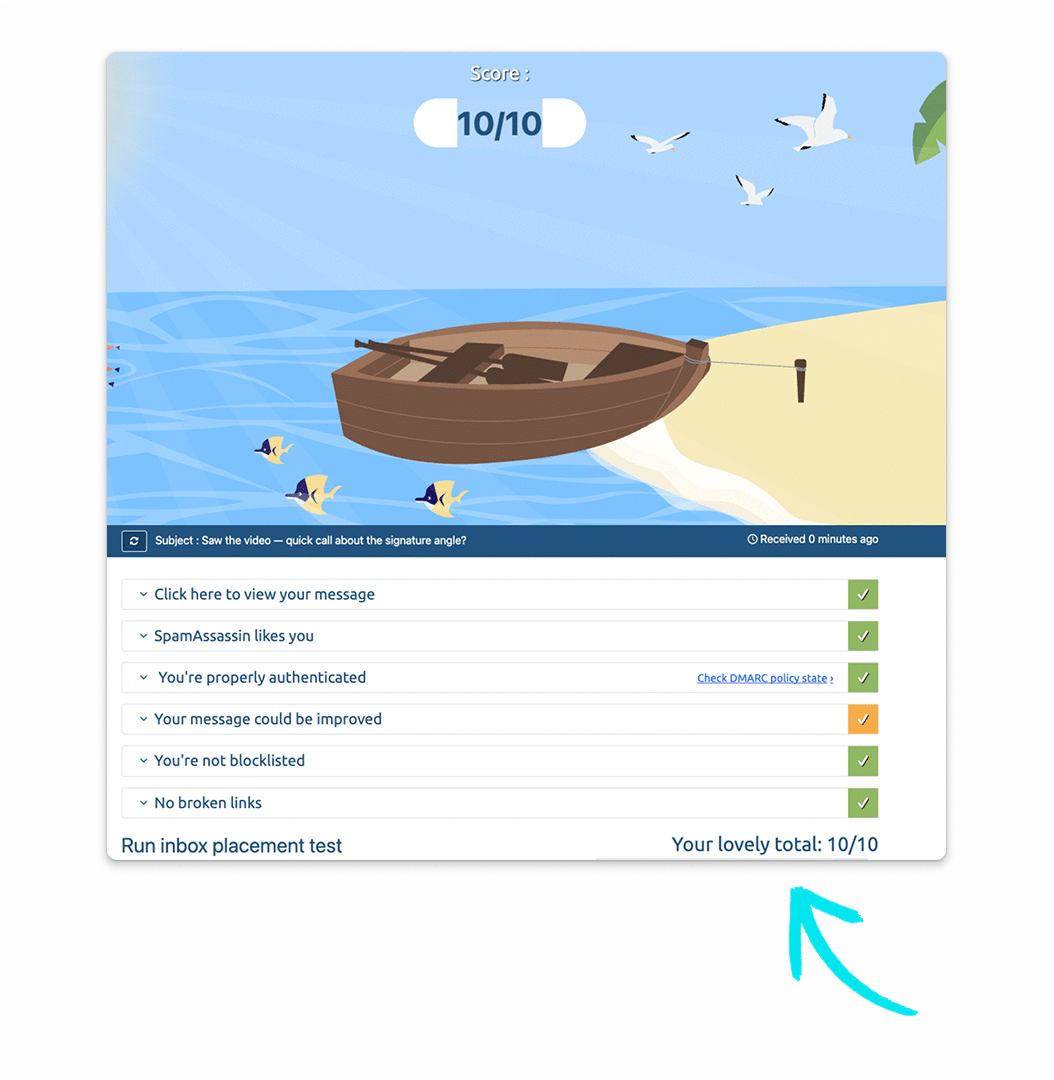
Plain-text and clean signatures – name, title, company, a link, a phone number – came back at a perfect 10/10. No penalty at all. If that’s roughly what your signature looks like, you can stop reading and go about your day.
# 2 Emojis won’t sink you
We dropped a few emojis into the body and the signature, then got greedy and added more. The score didn’t budge. So no, a couple of tasteful emojis are not the thing sending you to spam.
# 3 Links are fine, as long as they actually work
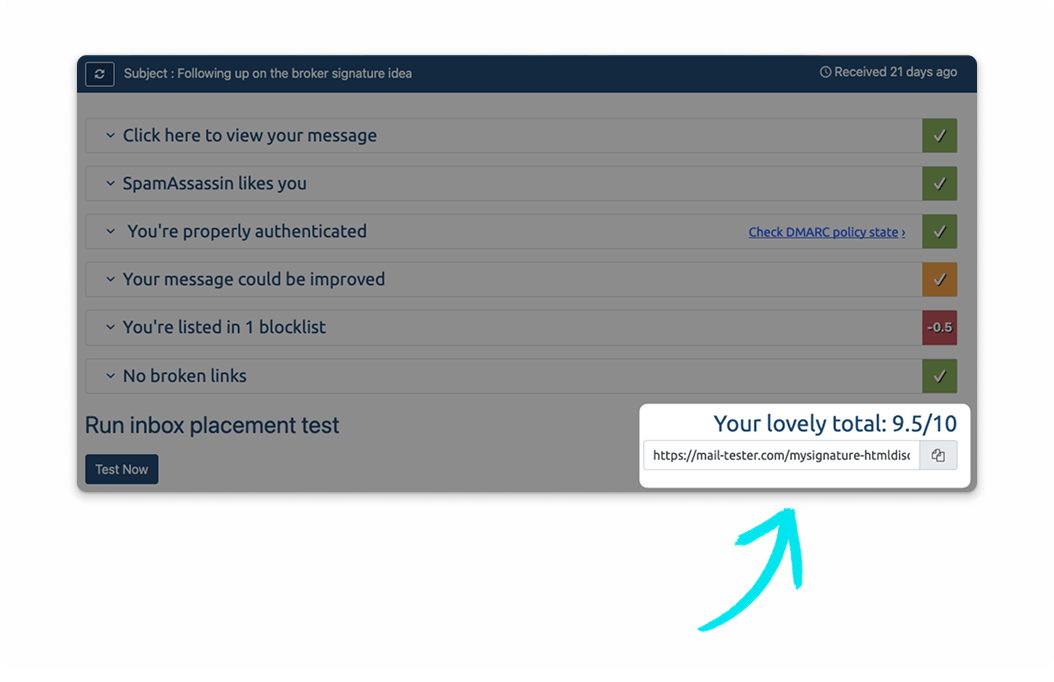
This one caught people off guard. We stuffed a dozen working links into an email, and it still scored a perfect 9.5/10, so “too many links” turned out to be a myth. What tanked the score was a broken link: one dead URL in the signature dragged it down instantly.
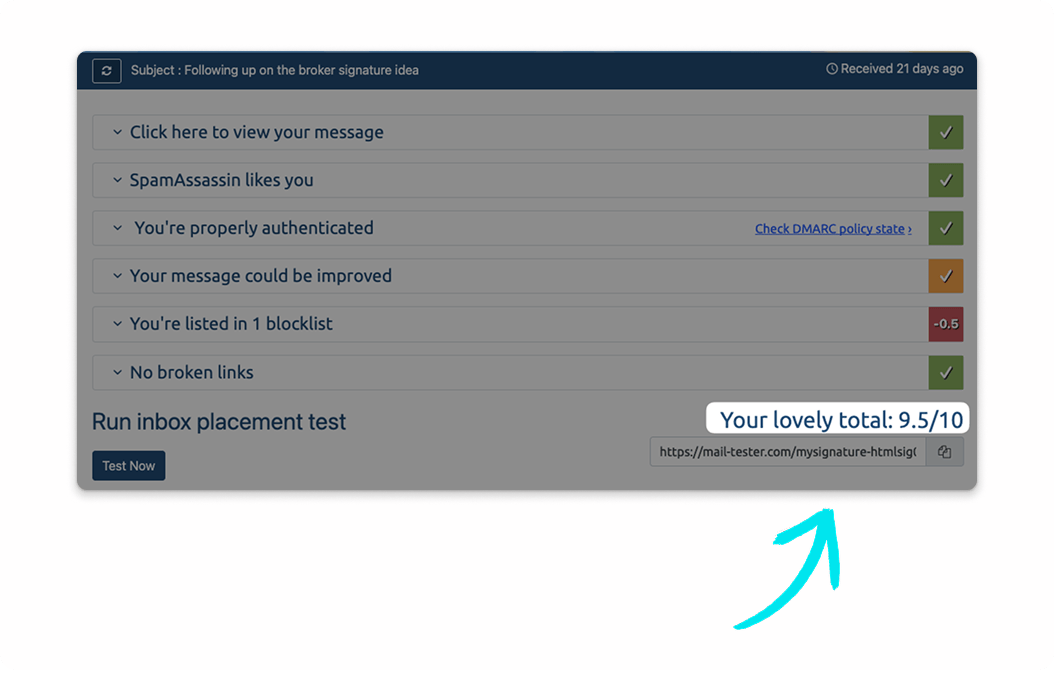
Here’s the sneaky part – a link can open fine in your browser and still be flagged as broken because some destinations block bots and return an error to automated checkers. Deliverability tools crawl your links the same way filters do, so every link needs to be reachable.
# 4 Images: it’s about size and hosting, not whether you have them
A photo or a banner isn’t a problem on its own. What matters is how the image gets into the email. When we pasted a large image directly into the message, the whole thing ballooned in size, the text-to-image ratio fell apart, and the score dropped.
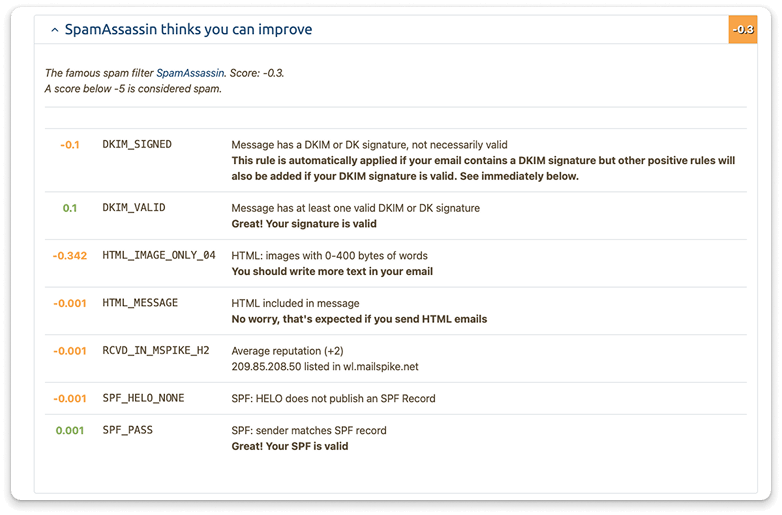
Take that exact same image, host it online and simply link to it – the way any decent signature tool does – and the email stayed featherlight and scored a perfect 9.7/10. The takeaway is simple: keep images small and host them rather than embed them.
# 5 Even a fully loaded, marketing-heavy signature scored 10/10
Then we threw everything at it. A real MySignature signature with a photo, social icons, a promo banner, a “Book a demo” button and a confidentiality disclaimer – the works, all at once. It scored a flawless 9.5/10. Because the images are hosted and the underlying structure is clean, you can run a rich, marketing-friendly signature and still land squarely in the inbox.
# 6 And what about the email itself?
We poked at the body too, holding the signature steady. More myths bit the dust: a dozen working links scored 10/10, and a two-line email scored 10/10 as well. The only things that nudged the score up, and only a little, were image-only emails with no real text, and obviously spammy copy: the ALL-CAPS “ACT NOW!!!” kind, plus link shorteners like bit.ly.
# 7 The words you choose matter more than you’d think
Using Postmark as our second opinion, we pushed the copy itself through spam filters. Ordinary professional writing and normal cold-outreach messages scored close to zero – spotless. What lit up the meter was spammy vocabulary. One loaded phrase like “No risk!” bumped the score all by itself.
An ALL-CAPS subject line cost a bit more. Stack the classics together – “dear winner,” “money back guarantee,” “free money,” and the email sailed clean over the spam line. Funny enough, exclamation marks on their own did almost nothing; it’s the spammy words and the pile-up that get you filtered, not the punctuation. Clean, human-sounding copy next to a clean, human-sounding signature is the winning combination.
What Does a Spam Filter Actually Check in Your Signature?
It helps to know what a spam filter is even looking at, because it’s far less mysterious than people suggest. Filters don’t hate signatures.
They weigh a stack of signals:
- whether your domain is authenticated
- how your sending IP has behaved lately
- the ratio of text to images
- whether your links resolve to safe and reachable pages
- whether the copy reads like a human wrote it or like a late-night infomercial.
Your signature only touches a couple of those signals – mainly image weight and link health. So when it comes to email signature deliverability, nail those two and the signature basically disappears from the filter’s radar, which is exactly what you want.
So What Actually Hurts Your Deliverability?
If the problem is rarely related to the email signature, then the cause usually lies in other elements of the email or the sending settings. In all tests where the score dropped, we found the same factors recurring. The main causes are listed below, from the most serious to the least significant.
- Weak authentication and a poor sending-domain or IP reputation. This one dwarfs everything else.
- Heavy, pasted-in images, and emails that are nothing but one big picture.
- Broken links, whether they’re dead URLs or links that block automated checkers.
- Link shorteners like bit.ly or tinyurl, and anything pointing to a shady or blacklisted domain.
- Spammy writing – ALL CAPS, “act now,” manufactured urgency, “free money.”
The Fears We Can Finally Put to Rest
Now for the good news, and there’s plenty of it. Most of the things users worry about turned out to be myths. In our tests, none of these elements had a measurable negative effect on the score, provided they were implemented correctly.
- Having a signature at all.
- A sensible number of links – a dozen working ones scored 10/10.
- A short email.
- Emojis.
- A photo, banner, social icons or a call-to-action button, as long as the images are hosted and sized well.
- A confidentiality disclaimer – it actually nudged the text balance in the right direction.
How to Keep Your Signature Out of the Spam Filter
If you want to make sure your emails never end up in the spam folder, we suggest taking a short test. It will take no more than 5 minutes, and you’re sure to be impressed by the results. So feel free to use this checklist and share it with your friends.
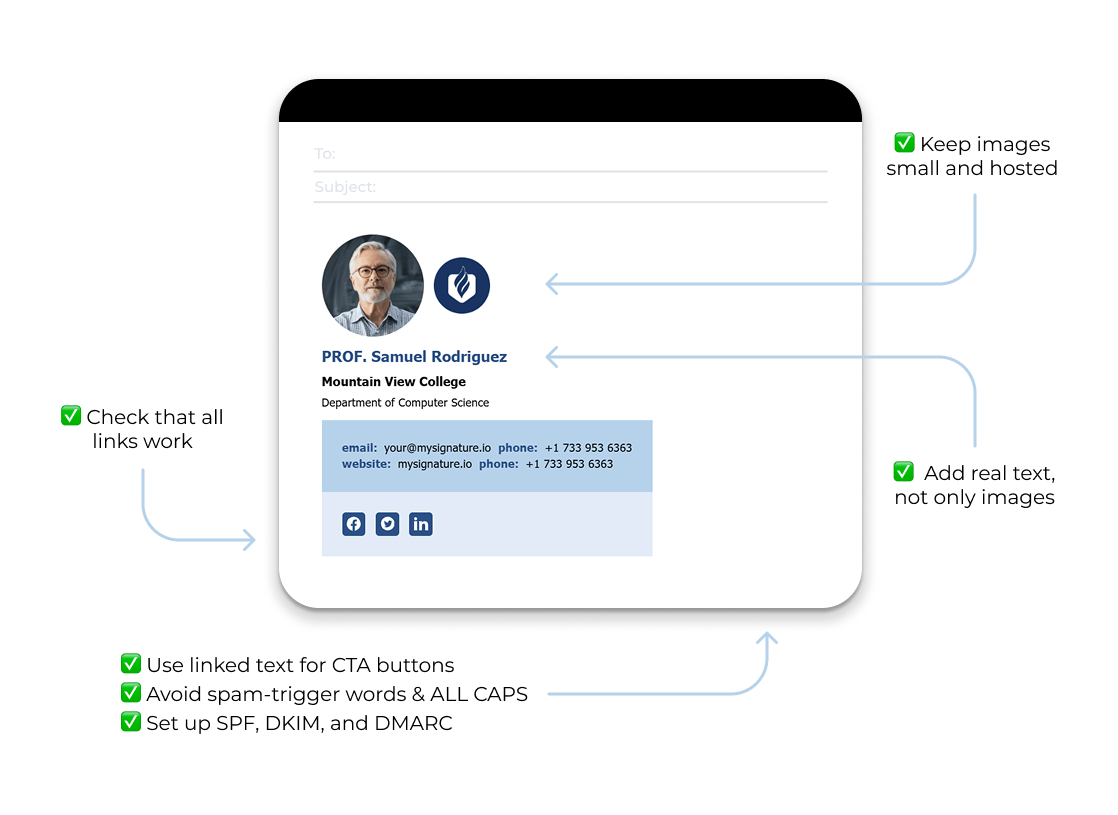
- Check your signature links every so often – one broken or bot-blocked link quietly chips away at your score.
- Keep images small (think tens of KB, not hundreds of KB) and always host them. Never paste them straight in.
- Make sure there’s real text in the email. Image-only messages are asking for trouble.
- Skip raw link shorteners. A branded short domain is perfectly fine.
- Build call-to-action buttons as styled text with a link, not as a bare clickable image.
- Watch your body copy as much as your design – steer clear of loaded phrases like “no risk,” “free money,” “guaranteed income” or “you’re a winner,” and lay off ALL-CAPS subject lines. A couple of exclamation marks won’t hurt; the words are what count.
- And the big one: set up SPF, DKIM and DMARC. Authentication beats every wording or design decision you’ll ever make.
DIY Signature vs a Signature Tool: Which is Safer?
Hand-building a signature and pasting your images in is the fastest way to hurt your email deliverability. Images get embedded, email balloons, the balance breaks, and it’s easy to leave behind a dead link or a raw shortener without noticing. A proper tool like MySignature takes that off your plate – images are hosted and sized correctly, links stay clean, and the markup is well-formed. That’s why every real MySignature signature we tested scored a perfect 10/10.

The Bottom Line
Your email signature isn’t the villain here. A well-built one, even a rich signature with a photo, a banner and a call-to-action – is completely inbox-friendly. When it comes to email signature deliverability, the horror stories almost always stem from sloppy implementation: giant pasted-in images, broken links, link shorteners, and spammy copy. Get your authentication right first, then keep your links alive, host your images, and your signature will make you look sharp without ever costing you the inbox.
Frequently Asked Questions
Can email signatures hurt email deliverability?
On their own, no. In our testing, a normal, even a rich, signature scored a perfect 10/10. A signature only becomes a problem when it drags in bad habits: a huge pasted-in image, a broken link, or a raw shortener. Fix those and the signature is a non-issue.
Do links and graphics in email signatures inhibit delivery?
Not just by being there. A dozen working links scored 10/10, and hosted graphics didn’t cost us a thing. What inhibits delivery is a broken link or a large image pasted directly into the email. Keep your links reachable and your images hosted, and you’re fine.
Does a personal photo in your email signature affect deliverability?
A headshot is completely safe as long as it’s hosted and reasonably sized. The photo itself isn’t the issue – a big, embedded image file is. Link to a hosted, compressed version (which is what signature tools do automatically) and your face won’t cost you the inbox.
Do emojis hurt email deliverability?
No. We added emojis to both the body and the signature, then piled on more, and the score never moved. A few tasteful emojis are fine. Just don’t lean on them to prop up a spammy, ALL-CAPS subject line.
How many links are safe in an email signature?
More than you’d guess. A dozen working links still scored a perfect 10/10, so there’s no magic cap you’re about to trip over. The number matters far less than whether every link actually works and points to a legitimate destination.
Should email signature images be hosted?
Yes, always. Hosting your images and linking to them keeps the email small and the text-to-image balance healthy, which is exactly what earned the top scores in our tests. Pasting images straight into the message bloats it and drags the score down. Any good signature tool hosts images for you by default.