
Last Updated on 31.08.2026 by Danylo T
Marketers often spend a lot of time fine-tuning email signatures, but the real threat lurking in inboxes isn’t about fonts or where you put your logo. It’s phishing, impersonation and all those snap decisions employees make every day, sometimes without even thinking.
Email is still the main doorway into nearly every business, and unfortunately it’s also the first place cybercriminals show up. Marketing teams in particular feel this. Think about it: Signatures, banners, campaign templates and everyone’s “reply-all” habits all end up in the same inboxes that scammers are constantly targeting. Having a beautiful brand in every email doesn’t help much if that inbox is also your company’s weakest security point.
Does your email signature hurt deliverability?
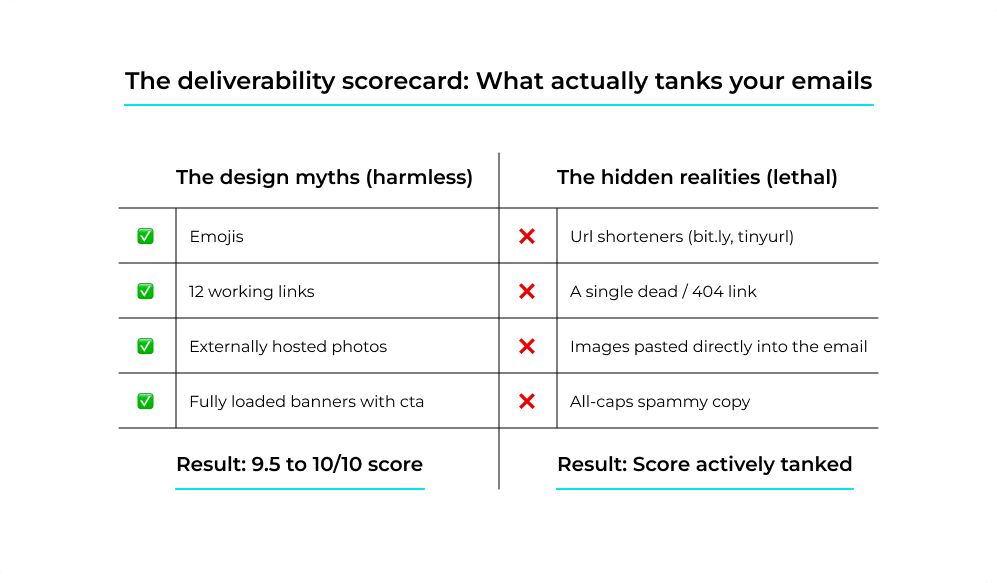
Short answer: no – not if it’s built properly. In a round of controlled tests, MySignature pushed 20+ email signature variations through mail-tester.com and Postmark SpamCheck, changing one variable at a time on a domain where SPF, DKIM, and DMARC were all passing. A plain-text block with name, title, company, phone, and one link scored a clean 10/10. A fully loaded signature – headshot, promo banner, CTA button and legal disclaimer – still scored 9.5/10. Emojis cost nothing. A dozen working links cost nothing. Externally hosted photos, banners, and social icons landed at 9.7–10/10. What actually pulled scores down was mundane and fixable:
- Weak authentication or a poor sending IP reputation – the single most damaging factor, and it outweighs every wording and design decision you will ever make
- Images pasted into the email instead of hosted – they bloat message size and wreck the text-to-image ratio
- One dead link – a single unreachable URL was enough to drop the score noticeably
- Link shorteners like bit.ly or tinyurl, which get read as evasion; a branded short domain does not
- Spammy copy – ALL-CAPS lines such as “act now,” “free money,” or “guaranteed income”
Teams keep worrying about this in the wrong order. On r/Emailmarketing, a marketer about to launch a cold campaign asked whether the Canva signature with clickable Instagram and LinkedIn icons would sink everything into junk, even though authentication was validated, the domain was warmed up, and the body copy carried no links at all. The signature was the one element they feared, and it almost certainly wasn’t the problem.
A widely shared r/sysadmin post from March 2025, titled “I am beyond frustrated that no one understands DMARC,” shows where the real problem usually sits: a marketer with ten years of experience got defensive about a deliverability complaint until the records were pulled up and SPF, DKIM and DMARC were failing on every message the organization sent. Signatures are a branding and trust lever, not a deliverability one; as long as the authentication underneath is real, the images are hosted, and nobody is shipping a dead link to a few thousand people.
Can AI audit your email signature for you?
It can, and this is the part of email hygiene AI is genuinely suited to, because every item on the list above is a checkable pattern rather than a judgment call. Point a model at your signature HTML and it will tell you which images are pasted instead of hosted, which links resolve and which quietly started 404ing after a rebrand, where somebody’s personal bit.ly slipped in, and which phrases read as promotional to a filter.
Run the same pass across the whole company and it catches what nobody audits by hand: the rep still linking to a campaign page retired two quarters ago, the three logo versions in circulation, the job titles that stopped being accurate two promotions back. DMARC aggregate reports are the other obvious job – they arrive as XML nobody opens, and a model turns a week of them into a plain sentence about which sending sources are failing authentication and why. Which leaves the question worth actually worrying about: not whether your signature lands, but who else is using it.
Why email still gets companies in trouble
No matter how many warnings they get, how many spam filters they install or how many break room posters promise cyber-safety, most companies still see attackers coming in through email. IBM’s latest Cost of a Data Breach Report found that phishing is the number one way breaches start.
Once someone falls for one of those emails, the average cost is $4.8 million. And if you add the U.S. average for all breaches, lost time, recovery and reputational damage, you’re looking north of $10 million. These aren’t just statistics; they represent significant financial and operational consequences for organizations, often just because someone clicked once, maybe before they even made their first coffee.
How a compliance training LMS builds habits that last
This is where a solid compliance training LMS steps up. Instead of treating security rules as something you check off during onboarding, a well-designed learning management system weaves training into the workday.
TalentLMS is one example of a platform that supports this approach. It’s a simple, flexible platform for training programs of all sizes. You can quickly set up job-specific security courses without making it a massive IT project. A marketing assistant handling email campaigns doesn’t need the same in-depth training as a finance manager approving wire transfers, so you create different learning tracks for each team. Pre-built courses let you get started fast, in days rather than months.
But the real benefit shows up down the road: The platform sends out automatic refresher courses when scam tactics change, tracks who’s actually getting things done and logs everything for auditors. This is particularly valuable if regulators or customers require evidence of compliance.
What’s really inside all those “you’ve got mail” messages
People talk about phishing a lot, but it’s actually a catch-all for a bunch of sneaky tactics. Classic phishing uses a fake login page or a dangerous attachment to steal credentials. There’s business email compromise (BEC), where someone pretends to be a boss, vendor or finance contact to redirect money or request private info. Then there’s social engineering in general, which relies on trust rather than exploiting software vulnerabilities.
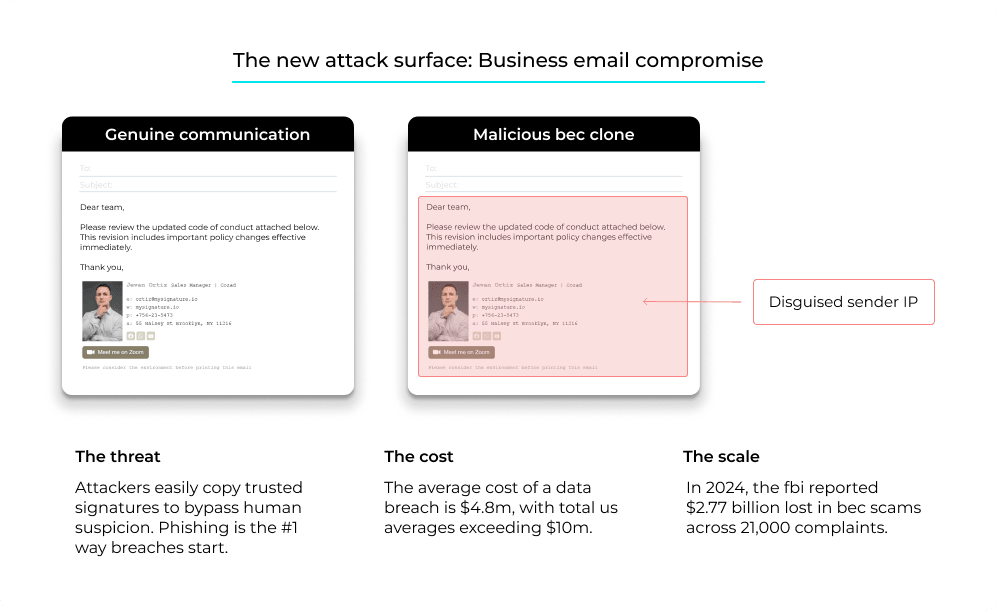
BEC especially hurts the bottom line. In just 2024, the FBI’s Internet Crime Complaint Center reported $2.77 billion lost in BEC scams across more than 21,000 complaints. And don’t think these are just sloppy criminals. In August 2025, the Department of Justice took down four Ghanaian nationals tied to a fraud operation that pocketed over $100 million by mixing romance scams and BEC attacks. Today’s attackers no longer rely on obvious spelling mistakes or poorly written emails. Now, their emails look just like any standard business conversation.
And the signature itself is now part of the attack surface. Every element that makes yours look trustworthy — the logo, the job title, the direct dial, the legal disclaimer — sits in plain sight at the bottom of every email your company sends, which makes it the easiest thing in your brand to copy. One r/k12sysadmin thread describes exactly that: staff across the organization received a polished internal “code of conduct” notice carrying the institution’s logo, real contact details and an employee’s actual signature block reproduced verbatim, with an attachment waiting at the end. The message traced back to an IP address in Nigeria. Nothing about it was spoofed in a way the DNS stack could catch, and that is the uncomfortable part: as a heavily upvoted r/sysadmin explainer on spoofing spells out, SPF only validates the envelope sender, DKIM only proves the message was not altered in transit, and none of those mechanisms care about the display name a human actually reads. Generative AI has since removed the last tell, matching your internal tone and naming conventions without any of the spelling mistakes people were trained to look for. Filters, transport rules and trained people are what is left standing.
A single training session won’t cut it
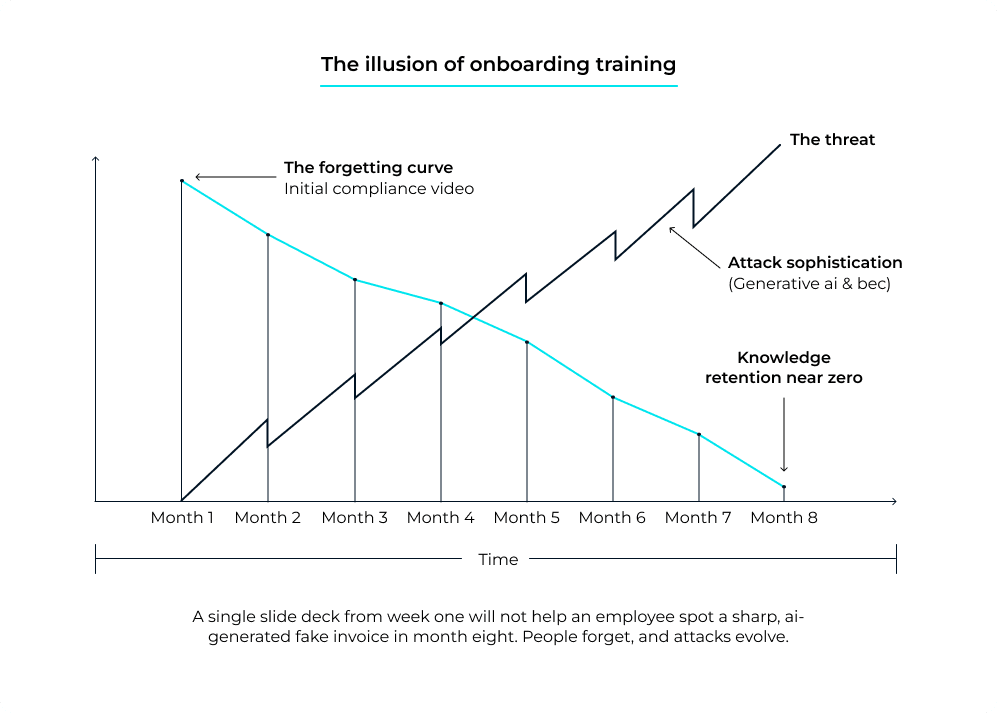
Here’s the tough truth: Simply watching a security policy video during onboarding, or receiving a PDF that is never opened again, isn’t enough. People forget. Attacks evolve. That slide deck from month one won’t help anyone spot a sharp fake invoice in month eight.
The numbers back this up. Employees without ongoing compliance training online fall for phishing tests about 33% of the time. Give them consistent, repeated security training for a year, and that drops to about 4%. That’s an 86% reduction. That’s not because of advanced spam filters or tighter policies; it’s real behavioral change. It happens only when people keep learning instead of trying to remember a forgotten rule.
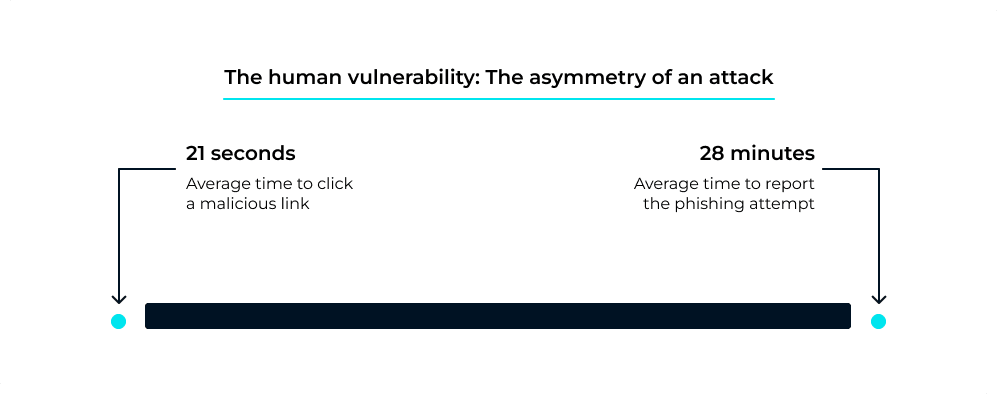
Timing matters too. According to Verizon’s annual breach report, it only takes about 21 seconds for someone to click a bad link, but it takes a lot longer to report the phishing attempt, around 28 minutes on average. That gap is a gift for attackers. You can’t solve it with tech alone; it’s a habit problem, and habits form only with regular practice.
Inbox safety is essential
Email is here to stay, and so are the people who try to exploit it. If your team sweats the details on branding and banners, you should sweat the details on inbox safety too. A good compliance training software isn’t just about ticking off a regulation.
It builds instincts that make someone pause before clicking, question a weird invite or double-check that odd payment request. That pause could be all that stands between a regular Tuesday and a very expensive one.
As email threats continue to evolve, leveraging AI and smart automation is becoming critical for protecting both deliverability and signature security. Staying vigilant, updating your tools, and fostering a culture of awareness are the best ways to keep your inbox—and your brand—safe.