
Last Updated on 17.08.2026 by Danylo T
Most teams see the email signature as just another piece of office stationery: name, title, maybe a logo if someone adds it. But every reply, forwarded thread, and cold email puts a clickable asset in front of people you want to reach. So how much traffic does that small block of HTML actually drive?
Why guess when you can look at the actual numbers? We collected anonymized analytics data from 5000 MySignature accounts, tracking 1,361,793 link clicks between 2018 and 2026. No surveys or vendor estimates, just real clicks from real signatures. And here’s what we found.
Key Takeaways
👉 A typical email signature gets around 60 clicks, while accounts with more than 100 clicks already outperform most of the dataset.
👉 Clear calls to action make signatures more valuable, with marketing and legal users generating some of the highest median click volumes.
👉 Company size increases total reach but not necessarily per-user performance, making signature consistency across the whole team especially important.
👉 Marketing roles outperform CEOs and founders, with a median of 133 clicks compared with 53 for CEOs and 49 for founders.
👉 Email client and account activity matter, as Microsoft 365 and Outlook users show higher median clicks while active accounts generate significantly more engagement.
What the Typical Email Signature Actually Gets
The average signature in our data got 281 clicks. That sounds impressive, but it can be misleading. When the data is skewed, averages don’t tell the whole story. The median, which shows what a typical user gets, is 60.
A small group of high-traffic accounts pulls the average up much higher than what most people see. So when you look at your own numbers, compare them to 60, not 281. If you get more than 100 clicks, you’re already in the top 37% of all accounts we reviewed.
Why the Top 1% of Users Get a Third of All Clicks
Performance characteristics vary significantly and follow a classic power-law distribution:
| User segment | Share of all clicks |
|---|---|
| Top 1% of users | 33.8% |
| Top 5% of users | 58.2% |
| Top 10% of users | 70.6% |
| Top 20% of users | 82.2% |
| Bottom 50% of users | 5.5% |
Only about 5% of accounts have ever crossed 1,000 lifetime clicks. That does not mean most signatures are dead weight. It means reach compounds.
The most successful accounts almost always did three simple things: they included a clear call to action in their bio, regularly updated their links, and implemented the same workflow across their entire active team. In this case, consistency beats luck.
Which Industries Get the Most Email Signature Clicks
We grouped users by industry, with at least 30 people in each segment – and ranked them by median to prevent a few outliers from skewing the results:
| Industry | Median clicks | Avg clicks | % of sample |
|---|---|---|---|
| Legal | 124 | 357 | 1.3% |
| Financial Services | 93 | 220 | 3.5% |
| HR & Recruiting | 77 | 141 | 1.0% |
| Marketing & Sales | 76 | 403 | 8.5% |
| Non-profit | 74 | 262 | 1.6% |
| Software & Internet | 70 | 488 | 1.6% |
| Real Estate & Construction | 65 | 264 | 8.7% |
| Healthcare | 51 | 622 | 1.9% |
| Consulting | 50 | 153 | 2.5% |
The legal field ranks first, with a median of 124 clicks, which is approximately 2.1 times higher than the overall median. In fact, this makes perfect sense, since the legal profession is based on trust and referrals. A signature serves both as a confirmation of authority and as a hub for connections, and people do indeed make use of it.
Financial Services comes next at 93. It is the same pattern: relationship-focused work, important conversations, and signatures that get clicked.
Healthcare is different. The average is 622, but the median is 51. A few large clinics raise the average, while most individual users are similar to everyone else. Always check both numbers.
And Marketing & Sales? They don’t have the highest median, but they lead in total volume. With 410 users and over 165,000 total clicks, they account for 12.1% of all clicks in the dataset.

How Company Size Affects Email Signature Clicks
An increase in email senders generally results in more clicks, though the growth is not strictly proportional.
| Company size | Median clicks | Avg clicks | % of sample |
|---|---|---|---|
| 1–5 employees | 56 | 223 | 17.1% |
| 6–10 employees | 114 | 433 | 4.7% |
| 11–25 employees | 231 | 766 | 2.9% |
| 26–50 employees | 109 | 635 | 1.1% |
| 51–100 employees | 85 | 538 | 0.4% |
| 100+ employees | 356 | 2,232 | 0.4% |
Moving from a 1–5 person team (median 56 clicks) to an 11–25 person team (median 231 clicks) results in a 4.1-fold increase. More team members lead to more outbound emails and greater opportunity for engagement.
However, when looking at the metrics on a per-subscription basis, the effectiveness decreases. For an individual user, there are approximately 48 clicks per subscriber, whereas for an account consisting of 11–25 people, this figure averages about 22 clicks per subscriber. Increasing the size of the team expands the overall reach but does not always improve individual metrics per subscriber.
This is a distribution issue rather than a headcount issue. The key opportunity is to ensure every team member’s signature is as effective as the best-performing one.
Which Job Roles Drive the Most Clicks
We have grouped thousands of job titles, submitted as free-form text, into job categories. This ranking disproves the common belief that a CEO’s or company founder’s signature is the most valuable asset.
| Role group | Median clicks | % of sample |
|---|---|---|
| Marketing | 133 | 1.4% |
| VP / Head of | 120 | 0.6% |
| President | 91 | 1.8% |
| Other C-level | 89 | 1.5% |
| Manager | 83 | 3.5% |
| Director | 82 | 5.7% |
| CEO | 53 | 7.0% |
| Owner | 55 | 5.2% |
| Founder | 49 | 3.6% |
Signatures created by marketers generate an average of 133 clicks. That’s 2.7 times more than those created by founders (49) and 2.5 times more than those created by CEOs (53). Why? The reason lies in behavior. Marketers view the signature as a communication channel. They include real calls to action, links to campaigns, and offers in their signatures.
Founders, on the other hand, treat it as a name tag. If you’re looking for a return on investment from signatures within your organization, stop looking at the top of the organizational structure. Focus on those who already think in terms of clicks.
While we’re on this topic, a brief geographical aside: the U.S. accounts for the bulk of the volume – 2,366 users and about 48% of all clicks – while Canada, the U.K., and Australia follow closely behind.
But volume isn’t the same as engagement. Canadian accounts average 468 clicks, compared to 277 in the U.S. The market is smaller, but engagement is higher. Don’t write off any region just because the number of users there seems small.

How Your Email Client Affects Signature Clicks
Where an email lives is more important than most people realize.
| Email client | Median clicks | % of sample |
|---|---|---|
| Microsoft 365 | 128 | 1.2% |
| Outlook | 85 | 11.0% |
| Apple Mail | 59 | 3.3% |
| Gmail | 51 | 13.5% |
| Google Workspace | 49 | 1.6% |
Outlook signatures land a median of 85 clicks versus 51 for Gmail – a 67% gap. Microsoft 365 environments climb to 128.
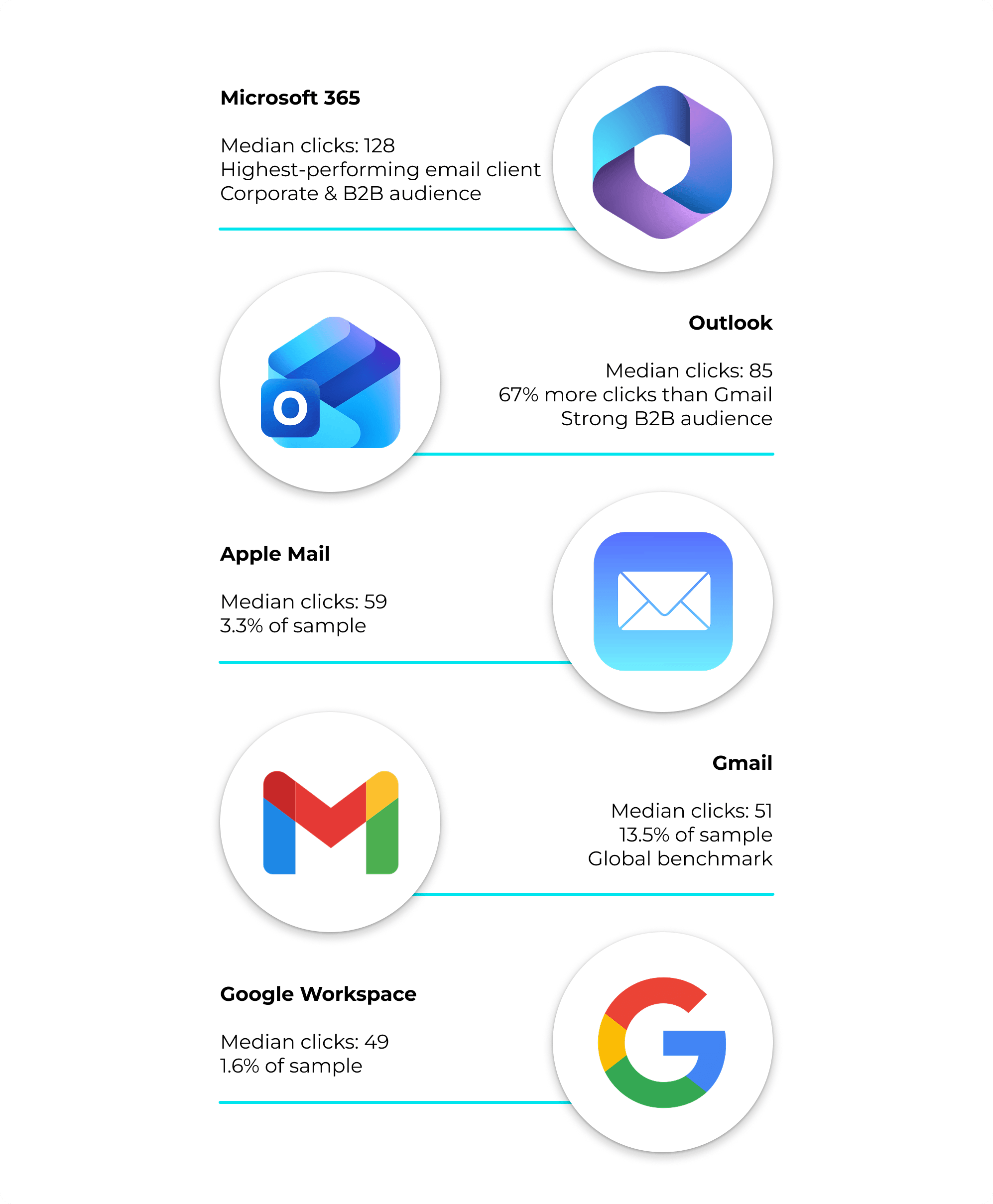
This is probably about audience, not software. Outlook and Microsoft 365 skew corporate and B2B. Signatures there land in higher-intent, work-context inboxes. If your buyers live in Outlook, your signature is a stronger channel than the Gmail-heavy global benchmark suggests. Thus, it is better to design for that.
Active Accounts are the Engine
One factor stands out above all demographic splits: subscription status. Active subscribers make up 44% of users but generate 65% of all clicks. Their median is 75, and their average is 412, both much higher than cancelled or terminated accounts.
Paid, engaged users are more than just retained revenue since they are the ones actively reaching out. Retention and signature ROI are closely linked, just seen from different angles.
What This Means For Your Team
Five factors distinguish bios that drive real traffic from those that gather dust in the digital space. You don’t need to set up a special redesign committee to do this. Choose one link worth clicking, post it on every active profile, and check your average metrics after a quarter. This simple step will put you ahead of those who still rely solely on a plain text listing of their name and job title.
- Your email signature can generate around 60 clicks.The higher figure is pulled up by a handful of outlier accounts. Most users land right around 60, so if you’re already above 100, you’re outperforming the majority. That’s a useful starting point before you make any changes.
- Add a real call to action. The legal and marketing departments get more clicks because they use their signature not just as a business card, but as a channel for interaction. One clear link works better than three decorative icons.
- Standardize across the team. Make sure everyone on the team uses the same strong signature. You only increase your reach when every signature is as effective as your best one. Closing the gap between seats will improve your overall results.
- Match the channel to the client. If you are selling to Outlook or Microsoft 365 users, expect higher engagement and make sure your signature is designed for that environment.
- Use email signature in each email you sent. It is an engagement that makes signatures a measurable source of traffic. Inactive accounts do not generate clicks.
Want to turn your own email signature into something people actually click? Build it free with MySignature – templates, tracked links, and team rollout in one place.

Methodology & Data Note
The figures come from anonymized MySignature account analytics, covering 5000 users and 1,361,793 tracked link clicks. Signup dates range from January 2018 to June 2026. Here, “clicks” means the total tracked link clicks per account, not per month. For each segment, we recruited 20-30 users to ensure reliable medians. We show both medians and means because the data is right-skewed. Company-size ranges were corrected after spreadsheet formatting issues in the original export. This is unique first-party data not available elsewhere.