
Last Updated on 25.03.2026 by Danylo T
You’ve probably spent hours squeezing a few extra clicks out of subject lines, button colors, and send times. Meanwhile, your team fires off hundreds (or thousands) of emails a day with a signature that does… absolutely nothing. That’s a lot of free attention left on the table.
Email signature marketing fixes that. It turns the bottom of every business email into a controlled, trackable channel that supports sales, brand, hiring, and customer growth—without asking anyone to send “one more campaign.”
This guide breaks down what email signature marketing is, how it works, and the smartest use cases for email across departments. You’ll get campaign ideas, real examples, and best practices you can actually apply, so every “Sent from my inbox” starts pulling its weight!
Key Takeaways:
👉 Email signatures are an untapped marketing channel that turns everyday emails into consistent brand exposure.
👉 Signatures work because they appear inside real business conversations where attention and trust already exist.
👉 A single email signature structure can support sales, marketing, hiring, and customer success without adding email volume.
👉 Centralized signature management makes campaigns scalable, consistent, and easy to measure across teams.
👉 Small, intentional elements like banners or CTAs can drive real engagement and conversions with minimal effort.
Contents:
- What Is Email Signature Marketing?
- Why Use Email Signature Marketing?
- Types of Email Signature Marketing Campaigns
- Effective Email Signature Marketing Examples
- Best Practices for Email Signature Marketing
What Is Email Signature Marketing?
Every corporate email ends the same way: with a signature. Names, job titles, contact information, maybe a company logo or a couple of social media icons. Most teams treat it as digital stationery—set once, forget forever.
But that’s where the opportunity quietly slips away.
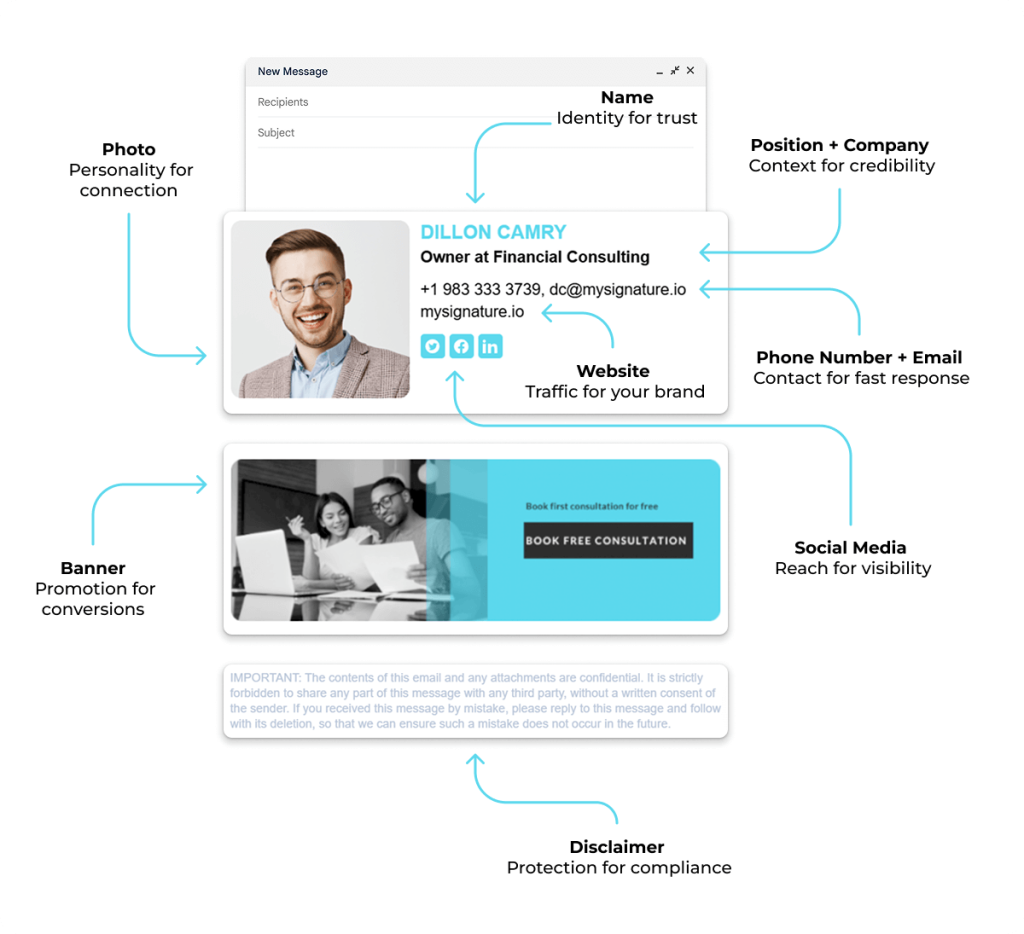
Email signature marketing is the practice of turning that static email sign-off into a controlled marketing channel. Instead of a plain block of text, a marketing email signature is intentionally designed to include messages, CTAs, promotional banners, or links that support active sales and marketing initiatives. The structure stays consistent and on-brand, while the content itself can change based on goals, campaigns, or audience segments.
At a foundational level, email signature marketing defines how email signatures are used for marketing purposes within everyday business communication. Specifically, it’s used to:
- Give email signatures across the company a clear role beyond basic contact details
- Make it easy for teams to use their email signature in approved campaigns
- Support email signature campaigns inside normal business email
- Enforce brand consistency across departments, roles, and email clients
Why Use Email Signature Marketing?
Once email signatures have a clear structure and ownership, the next question is obvious: why invest time in them at all?
The short answer is that very few marketing channels offer the same mix of reach, credibility, and efficiency as a well-executed email signature marketing strategy.
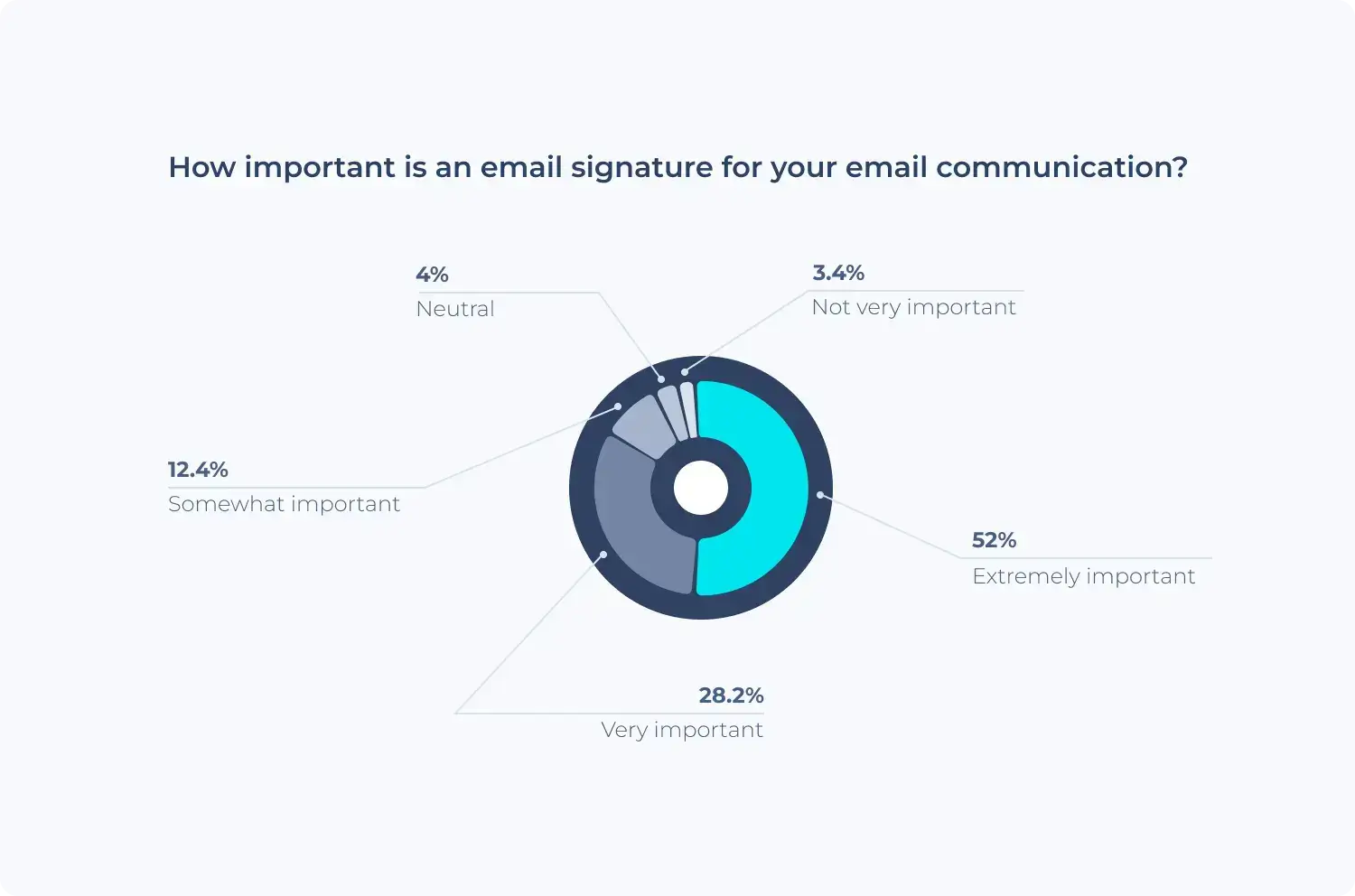
Email signatures sit inside real, one-to-one conversations. They’re seen by prospects, customers, partners, and candidates at moments when they’re already paying attention. When managed properly, that visibility translates into measurable impact across branding, engagement, and conversions—without adding more noise to your inbox.
Here’s where email signature advertising delivers concrete value.
Stronger brand recognition in everyday communication
Each email contributes to how a brand is perceived over time. Consistent use of professional email signatures ensures those impressions are aligned. Research shows that branding and awareness are the primary goals for roughly 41% of businesses using email signatures.
Repeated exposure to the same brand logo, layout, and tone reinforces recognition, particularly in B2B email marketing, where trust is built through ongoing interaction.
Email signatures become part of the brand’s presence in daily conversations, shaping familiarity long before a formal sales message appears.
Higher engagement shaped by context
Email signature banners and CTAs are placed where attention already exists. They sit alongside relevant messages rather than competing in crowded inboxes. This placement influences engagement.
Dynamic signature content delivers an average click-through rate (CTR) of 4%, compared to the 2.5% benchmark for standard email marketing campaigns, resulting in roughly 60% stronger click performance.
Credibility supported by professional presentation
Presentation affects perception. Email signature design contributes directly to how senders are viewed, especially early in a relationship. According to Mailtrap, around 70% of professionals say that a professional email signature increases credibility.
Consistent formatting, visible contact information, and branded elements help emails feel legitimate and reliable. This is particularly relevant for cold emails and early-stage conversations, where small signals influence response rates.
Consistent visibility without increasing send volume
Every email creates an email signature impression by default. Campaigns tied to signatures run as part of existing communication, without increasing the number of marketing emails sent. This allows teams to expand reach while keeping inbox volume stable.
For decision-makers tracking deliverability and engagement, email signatures provide a predictable source of visibility that aligns with everyday workflows.
Centralized control that scales across teams
An email signature management platform allows marketers to launch, pause, and update email signature campaigns without involving employees. Messaging stays current, and branding remains consistent across departments and email clients.
MySignature customer Taghreed S. noted, “MySignature is an excellent tool for creating professional and attractive email signatures. I love how easy it is to customize templates, add social media icons, and maintain a consistent brand identity across all our team members.”
This approach keeps execution aligned with broader email campaigns and business priorities, without slowing teams down or introducing manual errors.
Measurable performance aligned with modern marketing goals
Modern email signature tools offer visibility into email signature clicks, impressions, and conversions. These insights connect performance to real KPIs, helping teams evaluate effectiveness and understand how signatures contribute to overall results.
This also supports vibe marketing, where consistency, tone, and brand presence play a central role. Email signatures reinforce how a brand shows up in everyday communication, not just in scheduled promotions.
All in all, according to SuperOffice’s report, email signatures help over 65% of marketers boost their overall email marketing performance.
Types of Email Signature Marketing Campaigns
The impact of email signature marketing comes from how widely it can be applied. Once signatures are centrally managed, they stop being tied to a single team or objective and start supporting multiple business functions at the same time: sales, marketing, brand, HR, and customer-facing initiatives.
That range is already reflected in how companies use them. According to MySignature research, marketing email signatures are most commonly used for:
- lead generation (18.8%)
- social promotion (15.86%)
- newsletter growth (10.2%)
- product upsells (9%)
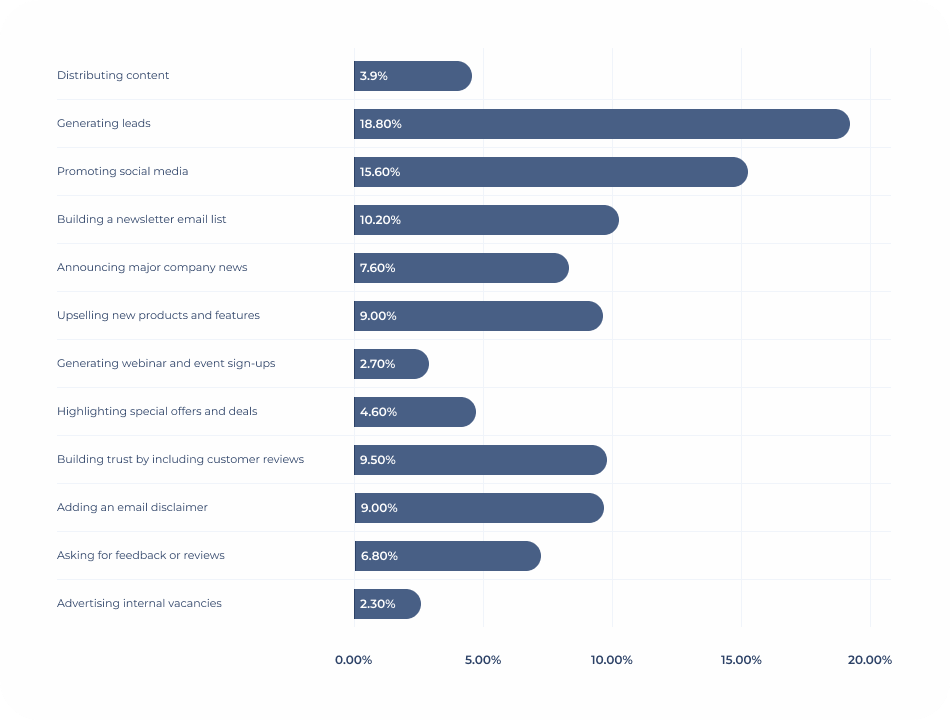
More than 32% of signatures include calls-to-action or banner elements, while nearly 40% focus on social media CTAs using social icons—often combined within the same signature layout.
Sales Campaigns
Sales teams rely on email more than any other channel. From first outreach to contract discussions, most buyer interactions happen inside one-to-one threads. That makes email signatures an effective way to guide prospects forward without disrupting the flow of the conversation.
In sales campaigns, email signatures are often used to reinforce the next logical step in the buying journey. Because they appear consistently beneath the message, they work equally well in manual outreach and automated email sequences, including transactional emails such as order confirmations or trial notifications.
Practical sales-focused email signature ideas include:
- A call-to-action linking to a demo, discovery call, or meeting scheduler, triggered once a prospect has viewed your email
- Email signature banner placements promoting upsell opportunities, such as premium plans, add-ons, or feature upgrades
- Cross-sell banners in transactional or automated emails, highlighting complementary products or services tied to the original purchase
- Links to relevant case studies, comparison pages, or customer stories that support an active deal
- Direct CTAs pointing to pricing pages or product landing pages for prospects already in late-stage conversations
- Light personalization elements, such as employee photos, to reinforce credibility and maintain a human tone
Marketing Campaigns
Marketing teams use email signatures to extend the life of existing campaigns. Instead of relying only on scheduled sends or nurture flows, signatures turn everyday communication into steady distribution.
In marketing campaigns, email signatures are usually tied to a single focus at a time, making them easy to rotate as priorities change.
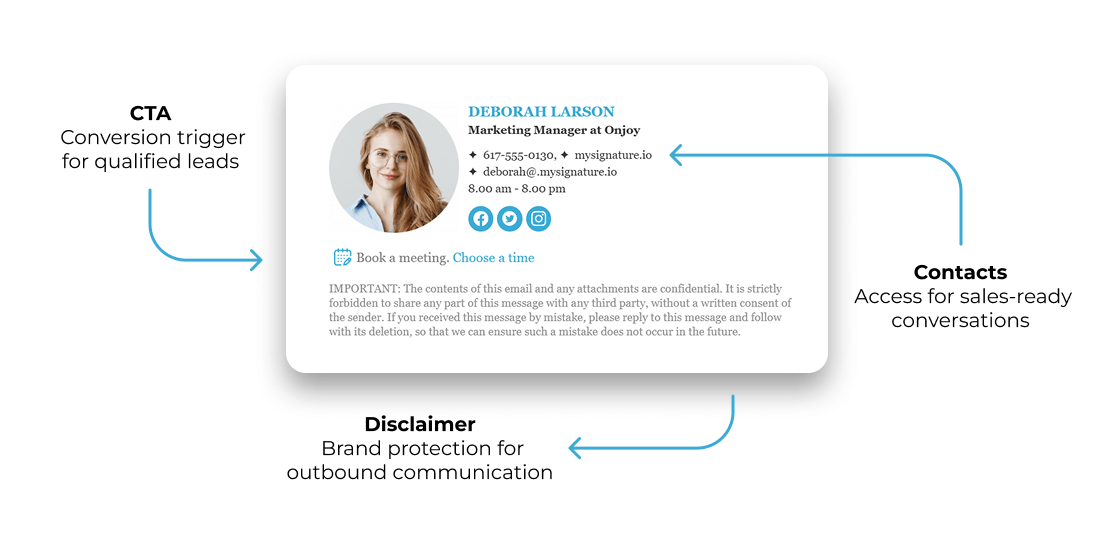
Common marketing-focused signature ideas include:
- Email signature banners promoting gated content such as white papers, reports, or webinars.
- CTAs driving traffic to a newsletter sign-up landing page.
- Banners supporting product launches, feature releases, or seasonal offers.
- Links to blog posts, videos, or case studies aligned with current messaging. For example, linking to helpful resources about digital marketing can educate prospects and drive additional traffic from everyday email conversations.
- Signature variations tailored by team or region to match local campaigns.
This approach reinforces campaign messages without increasing send volume or inbox fatigue. Marketing stays visible wherever conversations are already happening.
Brand Awareness Campaigns
Brand awareness campaigns focus on recognition and consistency rather than immediate action. Email signatures are well suited for this because they appear repeatedly in trusted conversations with the same email recipients.
In brand campaigns, the goal is to shape perception over time through familiar visual and tonal cues. Typical brand-focused email signature elements include:
- Consistent placement of the brand logo and approved color palette
- Social icons linking to active brand channels
- Short brand messages or taglines that reinforce positioning
- Visual elements supporting rebrands or refreshed identity systems
- Uniform layouts applied across email signatures across departments
These signatures create a steady, recognizable presence that supports long-term brand recall without competing for attention.
HR & Recruitment Campaigns
HR and recruitment teams depend on email to communicate with candidates, agencies, and internal stakeholders. Email signatures allow them to promote hiring initiatives naturally, within conversations that already matter.

Recruitment-focused email signature ideas often include:
- Links to open roles or the careers page
- Banners highlighting employer branding content or culture pages
- CTAs inviting candidates to join a talent pool or mailing list
- Visual cues such as team photos or employee photos to humanize outreach
- Messaging that reinforces values, benefits, or workplace culture
Customer Success Campaigns
Customer success teams use email signatures to support onboarding, adoption, and long-term retention. Their emails are frequent and highly contextual, which makes the signature a useful place to guide customers toward helpful resources.
Customer success signature campaigns commonly include:
- Links to onboarding materials, help centers, or documentation
- CTAs to book check-ins, training sessions, or review calls
- Banners promoting webinars, product walkthroughs, or updates
- Subtle upsell prompts tied to usage milestones or account stage
- Requests for feedback, reviews, or referrals after key interactions
Effective Email Signature Marketing Examples
Email signature marketing is only useful if it works in the wild—across real teams, real inboxes, and real business goals. That’s why examples matter.
Below are examples of email signature campaigns that show how a few smart elements—well-placed CTAs, clear messaging, and intentional design—can turn a routine sign-off into something that actually drives action!




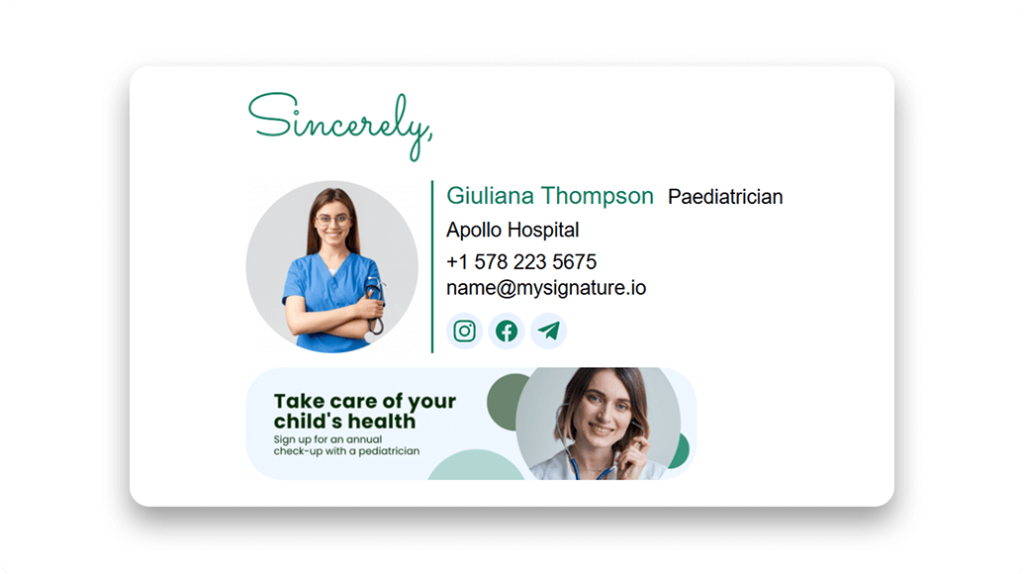
Building a great email signature like the email signature examples above is much easier with reliable email signature marketing software like MySignature.
MySignature is used by solopreneurs and small businesses that rely on email for sales, marketing, or client communication. Itoffers a large gallery of customizable email signature templates and helps you create a sign-off built for marketing efforts—complete with banners, responsive social media icons, CTAs, and more. The tool works best when email is a key communication channel and consistent branding matters, but may be less suitable for teams that rarely use email or require complex server-level customization.
If you’re ready to take your email signature to the next level, create an email signature with MySignature now!

Best Practices for Email Signature Marketing
The email signature examples in the previous section are a solid reality check: the best signatures look simple, feel intentional, and drive a clear action. MySignature’s examples make that easier because you’re not designing from scratch or guessing what a great email signature should include.
Still, templates are the starting line. If you want your email signature marketing to perform consistently across teams and campaigns, you need a few rules that keep everything clean, measurable, and scalable.
Here are the best practices that separate “we tried a banner once” from a real email signature marketing strategy.
Keep your design simple and mobile-friendly
Most email signatures look fine on a desktop preview and fall apart the moment they hit a phone. That’s a problem, considering over 80% of emails are now opened on mobile. If your signature breaks, your CTA disappears, your logo stretches, or your marketing banner turns into a pixelated mess.
Keep it readable, tappable, and consistent across inboxes.
Actionable ways to make your signature mobile-friendly:
- Keep the width conservative (around 320–600px) so it fits mobile screens without cropping
- Use a single-column layout; multi-column signatures often collapse in unpredictable ways
- Make buttons and links finger-friendly (avoid tiny text links packed together)
- Keep key details high in the signature: name, role, company, CTA
- Compress images so they load quickly on mobile networks
- Test rendering in major email clients, including Apple Mail, Gmail, Outlook, and mobile apps
- Validate formatting across Microsoft 365 and Google Workspace if your organization runs on either
Tip: A good rule: if someone can’t tap the CTA with one thumb, the design needs work.
Use one clear and visible CTA
Email signature marketing works best when you give the recipient one obvious path. One CTA. One job. Multiple CTAs tend to cancel each other out because the reader has to choose, and most people choose “do nothing.”
This lines up with how signatures are actually used. MySignature survey data shows that call-to-action buttons appear in 32.3% of signatures, and social CTAs are the most popular type—39.8% of respondents include them. Another 27.9% use CTAs that push a specific action: schedule a meeting, subscribe to a newsletter, buy a product, leave a review, and so on.
Integrating AI prospecting tools with email signature campaigns can help identify high-potential leads and tailor signature CTAs to drive even more engagement.
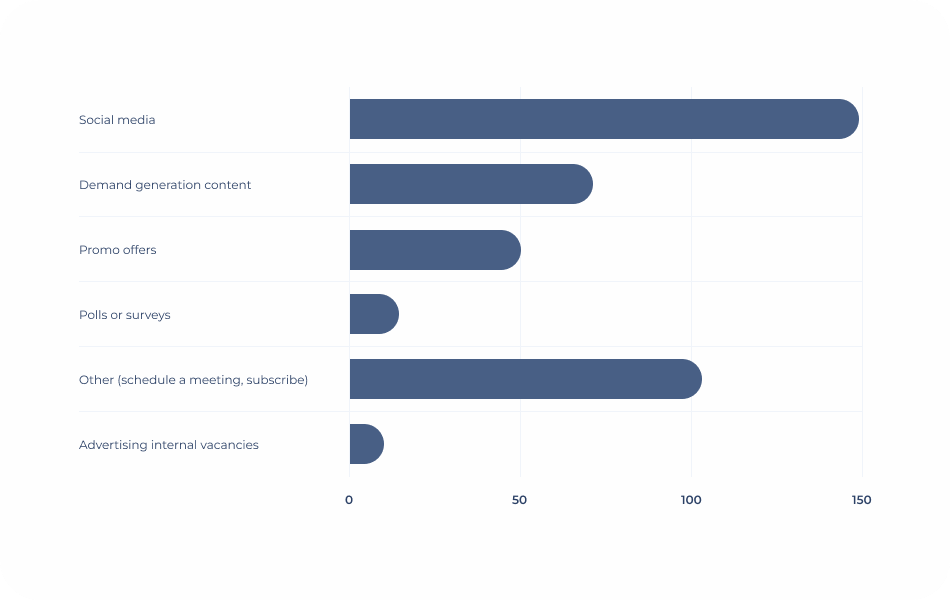
Best practices for CTA execution:
- Pick one primary action per campaign (demo, download, trial, review, follow)
- Use a button-style CTA when possible; it’s harder to miss
- Match the CTA to the sender’s role (sales CTA in sales emails, CS CTA in CS emails)
- Make the CTA benefit-focused and specific (“Book a 15-min call” beats “Learn more”)
- Link the CTA to a dedicated landing page so results are trackable
If your signature drives clicks but doesn’t lead anywhere useful, you’re collecting vanity metrics.
Stay consistent with your brand identity
Brand consistency is where email signature marketing stops looking like a random add-on and starts feeling like part of the company. Fonts, colors, spacing, brand logo placement, and tone should match the rest of your brand system, even if the signature includes a rotating marketing banner.
A few practical brand consistency checks:
- Use the same typography and color palette across all signatures
- Keep spacing and hierarchy consistent (no cluttered blocks of text)
- Standardize social links and icon style across the company
- Make sure any banner visuals match campaign branding and approved assets
- Ensure your email address domain matches the brand and links used in the signature (this is especially important for credibility and deliverability!)
Tip: Check out our guide to AI for personal branding to learn how technology can help you build a stronger brand.
A/B test different banners and messages
Once you have the basics right, testing becomes your shortcut to better results. A/B testing simply means running two variations of the same signature element (usually a banner or CTA), splitting exposure, then comparing performance to see which version drives more clicks.
To do this well in email signature marketing, keep the test small. Change one thing at a time, measure it, then move on.
Here’s a practical set of dos and don’ts for email signature A/B testing:
| Dos | Don’ts |
| Test one variable at a time (headline, CTA copy, banner image) | Change the banner, CTA, and layout all at once |
| Run tests long enough to reach a meaningful number of views | Call a winner after 20 clicks |
| Use the same audience segment for both variants | Compare results across different departments |
| Track results with consistent UTM parameters | Rely on “gut feel” or anecdotal feedback |
| Focus on one goal per test (clicks, sign-ups, meetings) | Measure three goals and pick the best-looking one |
Most email signature marketing platforms make testing easier by handling the split for you, rotating banners automatically or showing different versions based on simple rules. It saves time, cuts out guesswork, and keeps campaign automation practical instead of performative.
Track the performance of your email signature
Even after you’ve identified the best-performing variation, keep digging into the analytics. Email signature marketing improves fast when you treat it like a real channel, with real KPIs and a feedback loop.
These are the core metrics worth tracking and what they actually mean:
| Metric | What it tells you | Why it’s an important metric |
| Number of impressions | How many times the signature was viewed | Establishes reach across the company |
| Clicks | How many people interacted with your CTA/banner | Shows engagement volume |
| CTR | Clicks divided by impressions | Reveals creative effectiveness |
| Conversion rate | Clicks that resulted in an action | Shows business impact |
| Top-performing senders | Who generates the most engagement | Helps tailor campaigns to teams |
| Top-performing banners | Which visuals/messages work best | Guides future marketing initiatives |
Update your signature regularly
Email signature campaigns go stale. People stop noticing the same message, and outdated banners can make the brand look sloppy. The MySignature survey found that 44.4% of users update signatures 2–4 times per year, while 31.6% update them once every few years.
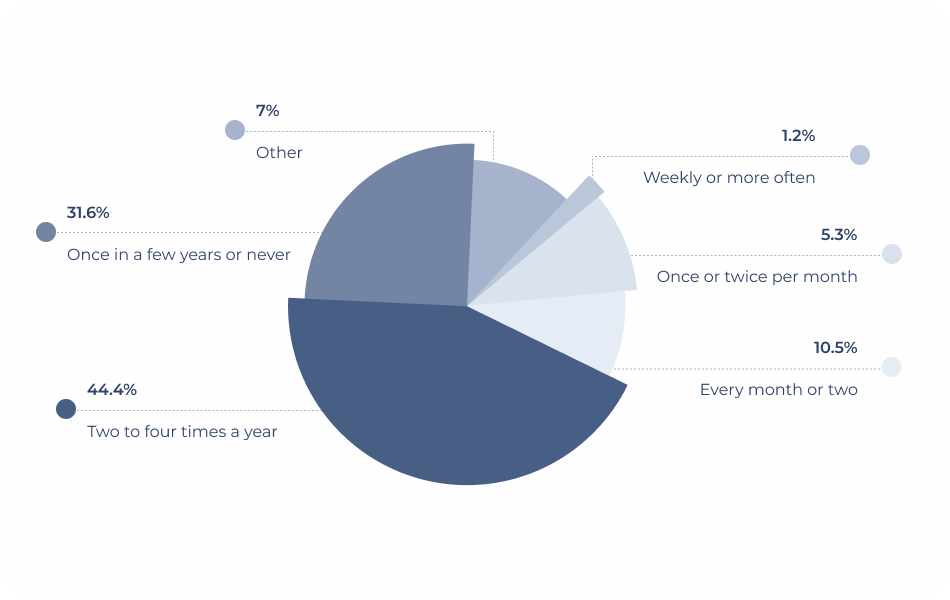
That data is useful, but it shouldn’t dictate your schedule. Updates need to align with your marketing efforts, product launches, hiring pushes, and seasonal initiatives.
A practical update rhythm depends on:
- Whether you run frequent campaigns or long-term evergreen banners
- How often your offers change (webinars, events, new features)
- The lifecycle stage of customers you’re targeting
- Whether different departments need different CTAs
- How quickly you can deploy changes across email signatures across the company
Tip: Use a dedicated signature manager to gain centralized control over signature updates. It’ll streamline the process and ensure nothing falls through the cracks.
Segment banners by department or audience
Finally, remember that marketing email signatures are rarely one-size-fits-all. A salesperson promoting a demo and a recruiter promoting open roles have different goals, audiences, and messages. Segmentation keeps email signature advertising relevant without fragmenting the brand.
Ways to segment effectively:
- Create different email signatures for sales, marketing, HR, and customer success
- Rotate banner campaigns by department based on active priorities
- Tailor messaging by region or language where appropriate
- Align customer success banners to lifecycle stage (onboarding vs renewal)
- Use role-based CTAs so every team drives the next best action
With segmentation done right, each department supports its own goals while still reinforcing the same brand.