
You meet someone interesting, exchange a few words, and then comes the awkward moment: do you reach for a stack of paper business cards, type your details into their phone, or send a link later and hope they remember you?
Digital business cards solve that problem — but the concept still raises questions. What are they exactly? How do they work in practice? And are they actually better than a traditional business card?
This guide breaks it all down: what a digital card is, how it works, the different types available, when it makes sense to use one, and how to set yours up so people actually save your details instead of forgetting them five minutes later.
Key Takeaways
👉 A digital business card is an online profile that shares your professional contact details and brand information through a link, QR code, NFC tap, or app instead of a physical card.
👉 Unlike traditional paper cards, digital business cards can be updated instantly, allowing your latest information to remain accurate everywhere the card is shared.
👉 Digital cards enable richer networking by including extended details such as social links, portfolios, scheduling tools, and company resources in one mobile-friendly page.
👉 Multiple sharing methods make digital business cards effective for both in-person events and remote communication, including email, video meetings, and messaging.
👉 Because they integrate with modern tools like CRMs and digital wallets, digital business cards can turn simple introductions into trackable leads and ongoing professional connections.
What Is a Digital Business Card?
A digital business card (also called a virtual business card or electronic business card) is an online profile designed to share your professional contact information and brand identity without using a physical card. Instead of handing over a piece of paper, you share a digital version that lives on a digital card platform or digital landing page.
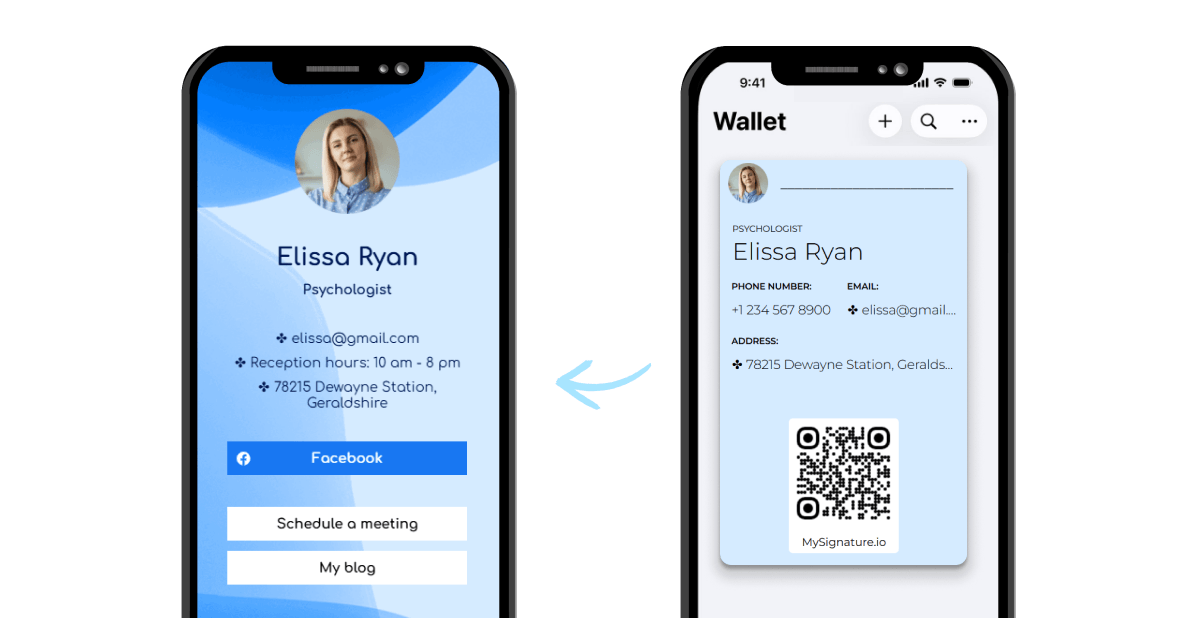
People can access it through a link, by sharing a QR code, via an NFC card, or through a compatible mobile app.
How Digital Business Cards Work in Real Life
We’ve already (briefly) mentioned how people typically access a digital business card—through a link, via QR code, an NFC card, or an app. Those options may sound technical at first, but in practice the process is straightforward.
Most systems rely on a simple exchange: one person shares their card, the other opens it on their phone and saves the contact details.
Below is how the most common sharing methods work during real-world networking.
Sharing a Digital Business Card by QR Code
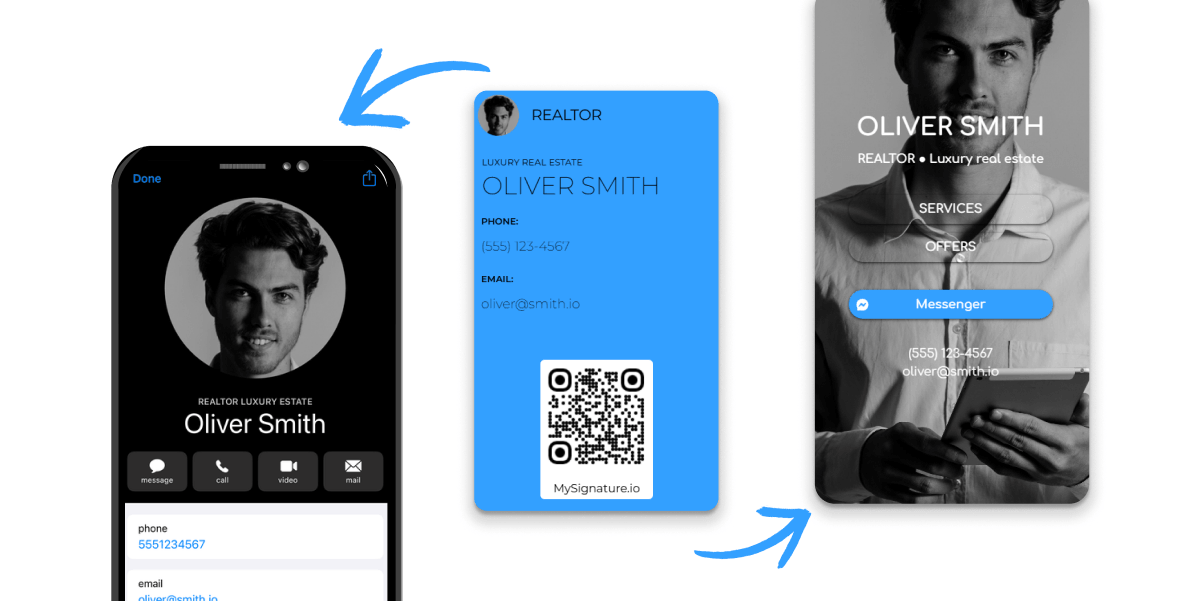
A QR code is one of the fastest ways to share an electronic business card during in-person meetings. The only things required are a smartphone with a camera and a visible QR code connected to your digital landing page.
What you need:
- A QR code generated by your platform
- A smartphone or tablet to display it
- The recipient’s phone camera or built-in QR scanner
How it works:
- Open your electronic business card in your phone’s mobile app or browser.
- Display the QR code linked to your card. Many platforms keep it ready inside the card interface or allow it to appear on screen quickly.
- The other person scans the code using their phone camera. Most modern devices recognize QR codes automatically without additional apps.
- The scan opens your digital business card landing page in the browser.
- The recipient reviews your contact details, website links, and other information.
- With one tap, they save you as a new contact or add your information to their address book.
Because scanning takes only a second, QR codes work well in busy situations where people connect in person, where exchanging physical cards would slow things down.
Sharing via NFC and Tap Technology
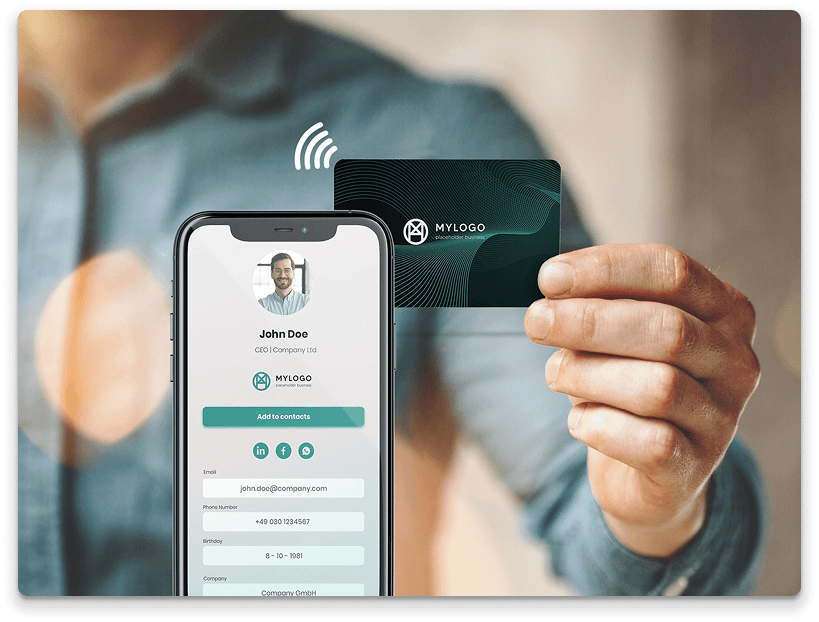
Another common sharing option relies on NFC business cards. NFC (Near Field Communication) allows two devices to exchange data when they are placed close together. If your phone or nfc card contains the chip, sharing your details becomes a quick tap.
What you need:
- An NFC card or NFC-enabled smartphone
- A device that supports NFC reading (most modern phones do)
- A digital business card connected to the NFC chip
How it works:
- Your NFC business card or phone is programmed with a link to your e-business card.
- During a meeting, you bring the NFC card close to the other person’s phone.
- The phone detects the NFC signal and displays a notification.
- When the recipient taps the notification, your digital business card opens automatically.
- They can then review your contact info, follow a social media link, or save the card directly to their saved contacts.
The interaction feels natural. A quick tap replaces the old routine of handing over traditional paper business cards.
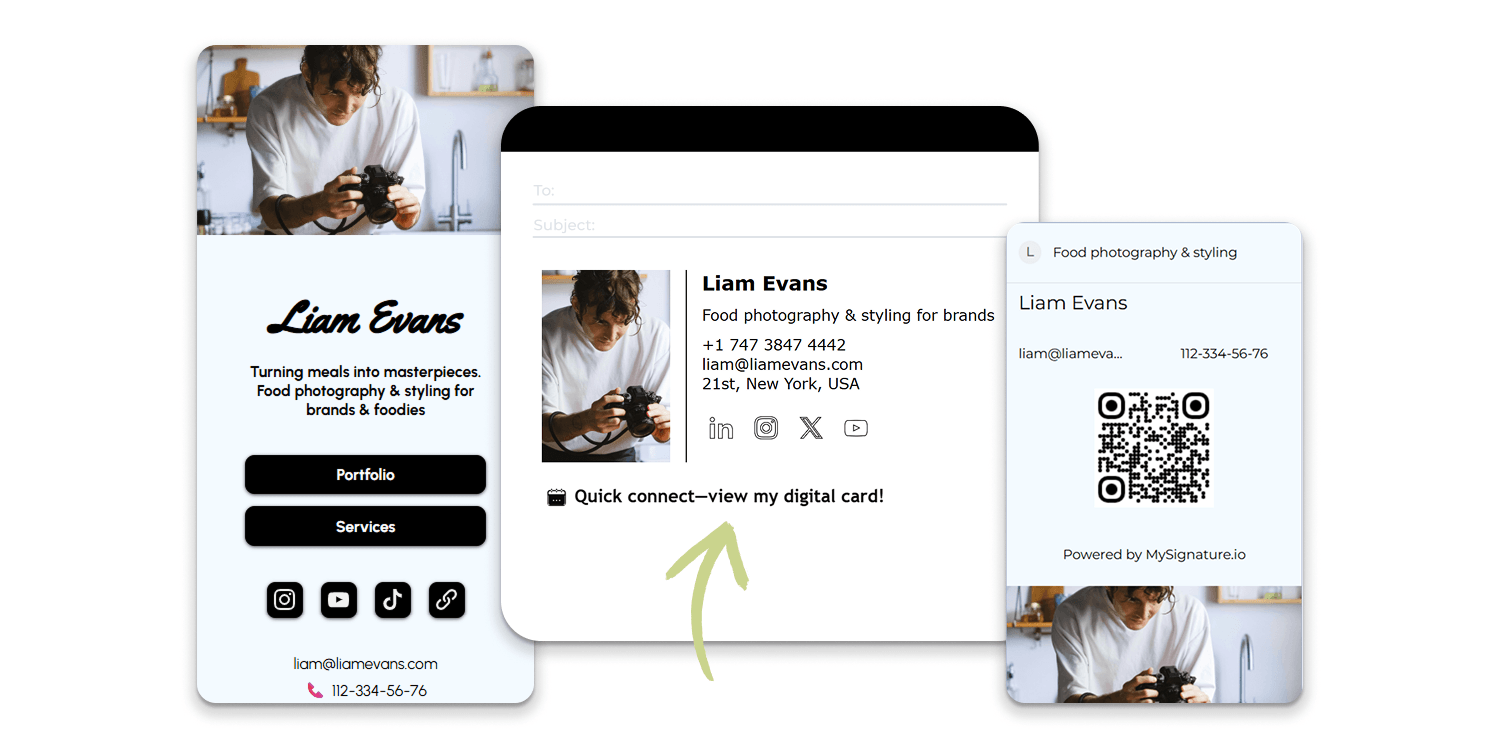
Sharing with a Link or Email Signature
Online cards are also designed for situations where people connect online rather than face-to-face. A simple link allows you to instantly share your professional profile during emails, video calls, or messages.
What you need:
- A shareable URL connected to your digital business card
- An email signature, messaging app, or website where the link can appear
How it works:
- Generate a direct link to your card from the electronic card platform.
- Add the link to your email signature, messaging profile, or meeting chat. Many professionals include it in tools connected to Google Workspace or Microsoft Dynamic environments.
- When someone clicks the link, your digital landing page opens in their browser.
- The page displays your contact details, company information, and website links.
- The visitor can save your information as a new entry, download the card to their digital wallet, or keep the link for later reference.
This method works particularly well for remote communication. Instead of attaching files or typing details manually, one link handles the entire exchange.
Tip: Check out our guide on How to Share a Digital Business Card for more details, best practices and actionable tips.
What Information Does a Digital Business Card Include?
When someone opens your digital business card, they should immediately see the details needed to identify you, understand what you do, and reach out without friction. Most cards function as a compact digital landing page that organizes professional information in a format built for quick viewing on a phone.
The exact layout depends on the digital business card platform you use, but the structure tends to follow a consistent logic: start with the essentials, then add supporting elements that strengthen your brand and make contact easier.
Essential Information (Core Details)
These are the non-negotiables. Without them, a virtual business card can’t do its job.
- Full name: The main identifier displayed at the top of the card.
- Job title and company name: Provides context about your role and professional focus.
- Phone number: Enables direct calls or messaging.
- Email address: Still the default channel for business communication.
- Primary website or company page: Often included as clickable web links.
- Profile photo or company logo: Adds recognition and reinforces your brand.
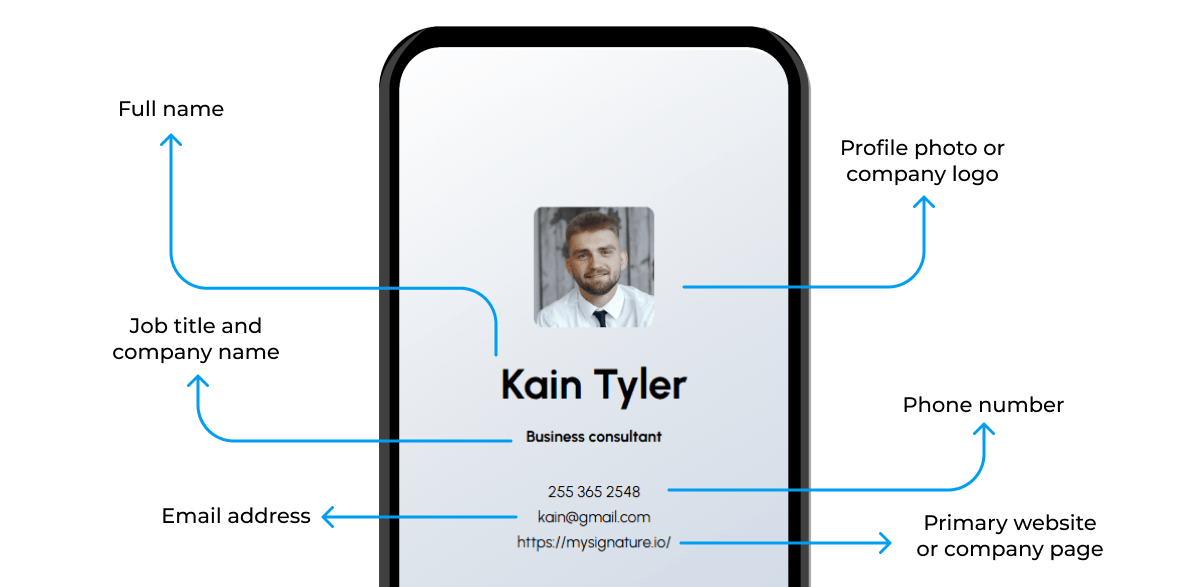
Together, these details allow someone to quickly save your personal details as a record in their contacts without relying on a business card scanner or typing details from traditional printed business cards.
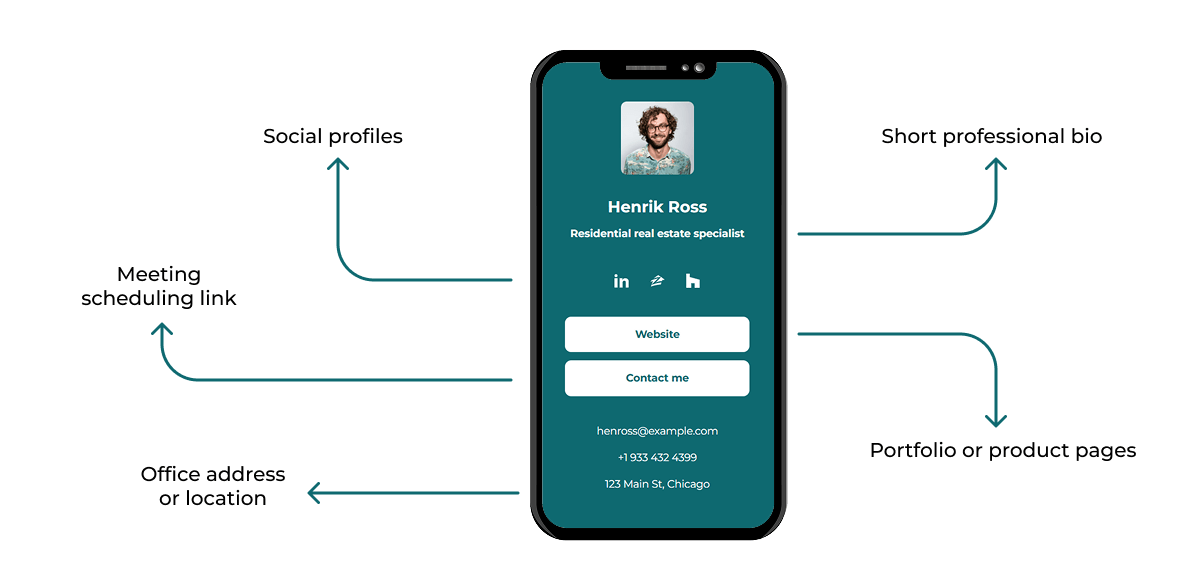
Optional Details That Make the Card More Effective
Many professionals expand their card with additional information that supports networking and ongoing communication.
- Social profiles: A social media link—often LinkedIn—helps people continue the conversation online.
- Short professional bio: A brief explanation of your expertise or services.
- Office address or location: Useful for teams with a physical presence.
- Meeting scheduling link: Lets people book a call or meeting directly.
- Portfolio or product pages: Extra site links that highlight work, services, or case studies.
- CRM or contact management features: Some digital business card providers support CRM integration, helping teams move new connections directly into systems like Microsoft Dynamic or Google Workspace.
Digital Business Card vs Traditional Business Card
One of the clearest differences between digital business cards and print business cards comes down to space.
A paper card has to fit everything inside the standard 3.5 × 2-inch format. That leaves room for the essentials—name, title, company, and a few contact details. Add too much and the design quickly feels crowded.
A virtual one doesn’t face that constraint. It opens as a digital landing page, where you can include full contact information, page links, and other resources without squeezing them into a tiny layout.
Space is only part of the comparison. The two formats also differ in how they’re shared, updated, and used after the initial exchange.
Key Differences
The contrast between a traditional business card and a digital one appears across several practical areas.
How the card is shared
Printed cards depend on a physical exchange. Online cards support multiple sharing opportunities, including through QR code, an NFC card tap, or a link sent through email or messaging.
Updating details
Once paper introduction cards are printed, the information is fixed. A web card can be edited at any time. Update a phone number or role once and the change applies everywhere the card is used.
Saving the contact
With printed company cards, recipients often type details manually or use a business card scanner. Web-based cards simplify contact sharing by allowing someone to save your profile in their device directly from the card page.
Integration with business tools
Many digital platforms support CRM integration, allowing new records to move directly into systems connected to Google Workspace or Microsoft Dynamic. A physical card sits outside that workflow.
Pros and Cons of Each Option
Both formats still play a role in professional interactions. Each comes with practical advantages and limitations.
Pros and cons of digital business cards
| Pros | Cons |
| Multiple sharing options such as QR codes, NFC taps, or links | Requires a smartphone or connected device |
| Can include extended contact information and URLs | Some audiences still prefer traditional paper cards |
| Details can be updated instantly | Requires choosing a online card platform |
| Supports CRM integration and automated contact capture | Platform capabilities vary |
| Enables bulk card creation for teams | Less familiar to some users |
| Works well for remote relationship building and email introductions | Dependent on device battery |
| Can connect with tools like Google Workspace | Initial setup takes time |
Pros and cons of traditional business cards
| Pros | Cons |
| Simple, widely recognized format | Limited space for information |
| No technology required | Updates require reprinting |
| Tangible and easy to share | Easy to lose or discard |
| Works without internet or devices | Contacts must be entered manually |
| Can reinforce brand through physical design | Printing costs accumulate |
| Accepted in formal settings | No integration with digital tools |
| Immediate handoff in person | Cannot link to online resources |
When Digital Business Cards Make More Sense
Printed ones still work well in traditional settings. But many professionals increasingly rely on digital ones because they align better with modern communication.
A digital business card is often the better choice when:
- You meet many people quickly: Sales teams, founders, and consultants can share details through QR scans or NFC taps without carrying stacks of physical cards.
- Your information changes often: Freelancers, startups, and growing small businesses can update roles, services, or phone numbers instantly without reprinting materials.
- Your introduction includes more than basic contact details: Portfolios, booking links, or product pages fit naturally on a digital landing page.
- Your company manages contacts through a system: Teams using CRM integration can capture new leads directly instead of entering information from traditional cards.
- Most communication happens online: Email, LinkedIn, and video meetings make sharing a virtual card far more practical than sending a printed one.
Types of Digital Business Cards
Digital business cards come in several formats, depending on the technology used to host or manage them. Most digital card makers offer a mix of options designed for different business situations and levels of contact management.
Web-Based Digital Business Cards
A web-based digital business card exists as a hosted digital landing page. The page contains your first and last name, address, job title, web links, and brand details in a layout that opens on any device. Because it lives online, updates happen instantly without replacing the card. For many professionals, this format forms the backbone of simple, reliable contact sharing.
NFC Digital Business Cards
NFC business cards use a small embedded chip to connect a physical card or device to your online profile. When the chip is detected by a nearby phone, it opens your online business card, allowing you to share your details quickly during in-person conversations. This approach blends the familiarity of a card with the flexibility of digital networking.
QR Code Digital Business Cards
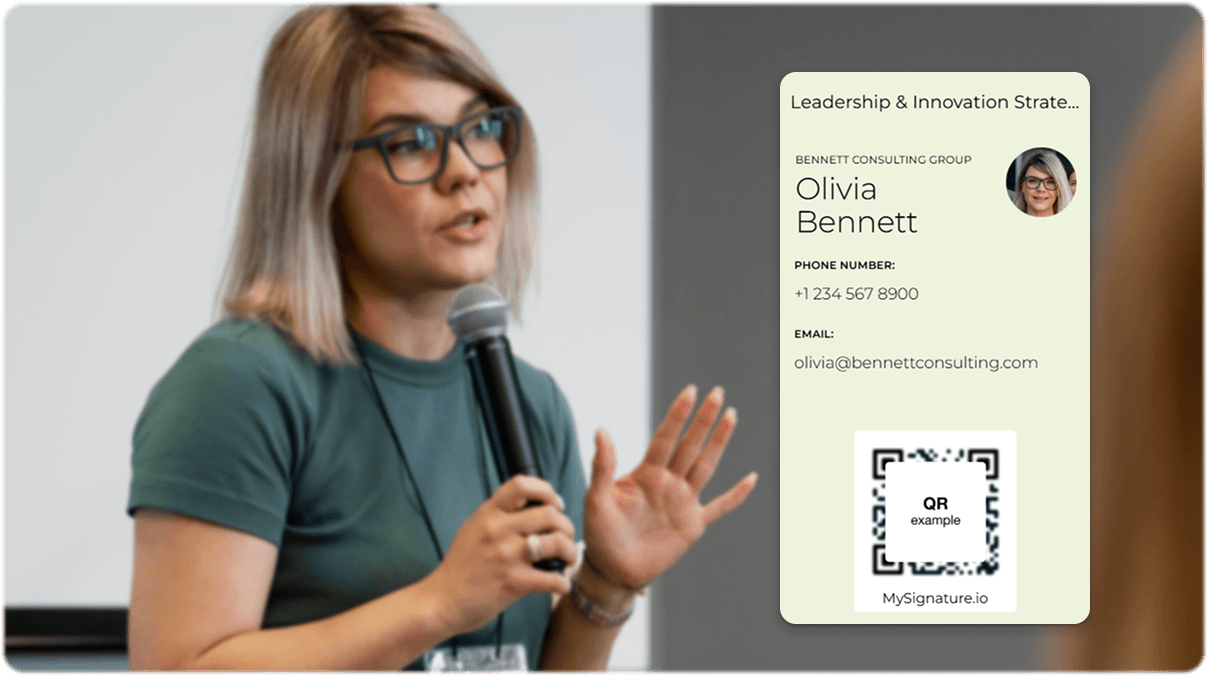
A QR code digital business card links a scannable code to your online profile. The code can appear on presentations, marketing materials, or even virtual backgrounds, making it easy to distribute your information in both physical and digital spaces.
App-Based Digital Business Cards
Some digital business card apps provide a dedicated smartphone app for creating and managing cards. These platforms often include team features such as bulk card creation and centralized contact tracking—tools that help companies build lasting connections and operate as a more smart business.
Benefits of Using a Digital Business Card
For many professionals, the appeal of a digital business card comes down to practicality. It removes several small frictions that slow in-person interactions and replaces them with faster, more flexible ways to exchange information.
Key advantages include:
- Quick setup and distribution: You can create a digital business card in minutes and start sharing it immediately (no printing, shipping, or inventory to manage).
- Flexible presentation of your brand: Most digital business card apps offer customization options that let you control layout, colors, links, and branding elements.
- Professional credibility and security: Leading platforms that position themselves as the best digital business card providers often follow compliance standards such as SOC 2 type security frameworks.
- Compatibility with modern devices: Cards can integrate with tools people already use, including Google Pay, digital wallets (like Apple wallet or Google wallet), or even quick access from devices like an Apple Watch.
- A smoother contact exchange process: Virtual cards simplify contact exchange, making it easier to build and maintain professional relationships.
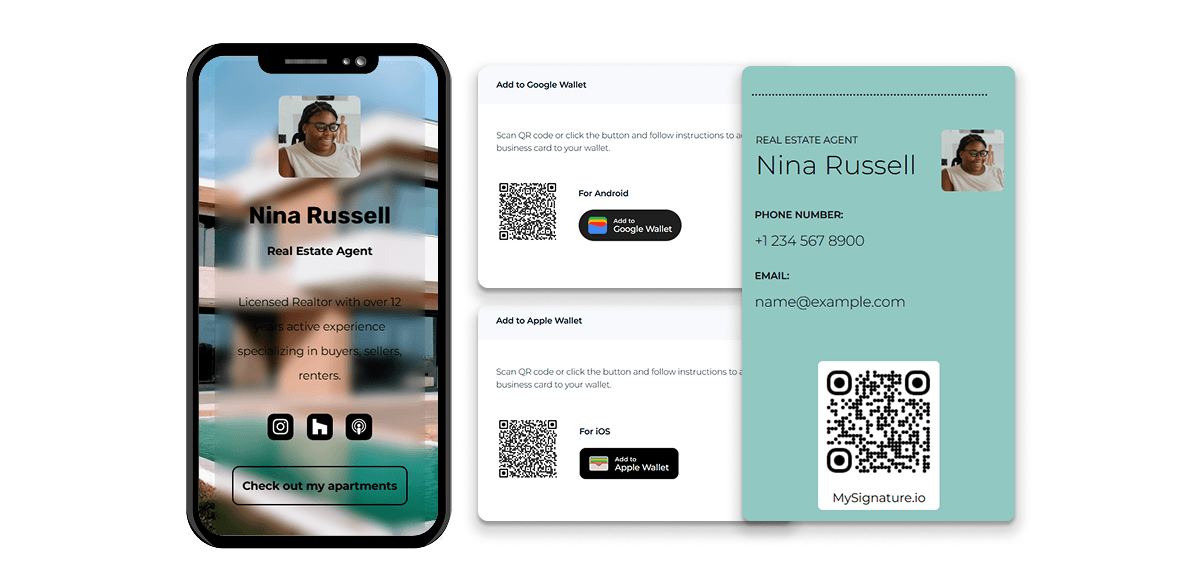
Tip: Make sure your cards are available at all times. Learn How to Add Your Digital Business Card to Apple Wallet on iPhone in our guide.
Who Should Use a Digital Business Card?
The benefits above make digital business cards useful for a surprisingly wide range of professionals. As more introductions happen through phones, messaging apps, and video calls, many companies are realizing that business cards are the future, just in digital form.
In tech-forward environments, a virtual business card feels natural. In more traditional rooms, it can stand out among stacks of paper and make your introduction easier to remember.
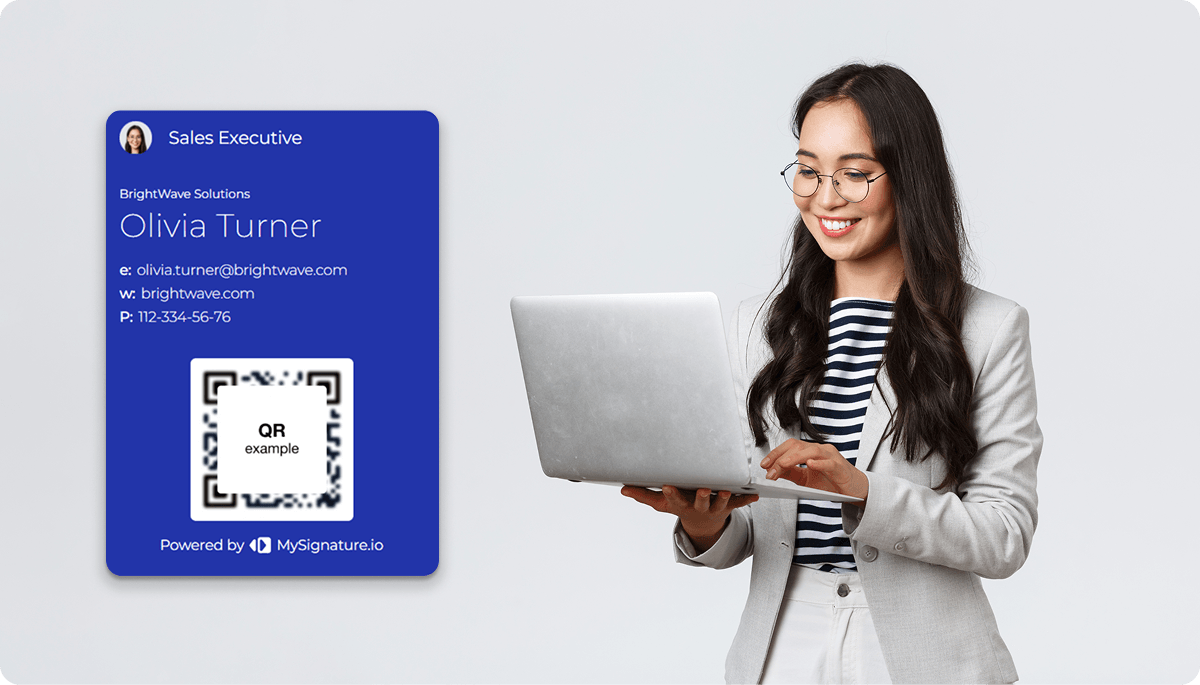
Digital cards tend to work especially well for:
- Sales and business development teams who meet new prospects constantly and rely on fast contact sharing.
- Entrepreneurs and founders focused on expanding their network.
- Consultants and freelancers who often need to share your details along with portfolio or project links.
- Small businesses looking for consistent branding without printing batches of physical cards.
- Remote professionals whose introductions happen through email, LinkedIn, or video meetings.
Common Digital Business Card Use Cases
The professionals mentioned earlier use digital cards in different ways. The format is flexible, so the purpose often depends on the information included and the situation. A single digital business card can support everyday networking, outreach, or even marketing.
Learn more how a digital business card can help for networking in “What is a digital business card and how does it work in networking?”.
Common use cases include:
- Industry events and conferences where attendees exchange details without collecting stacks of contact details cards.
- Sales introductions that combine contact information, product pages, and meeting links in one place.
- Email signatures that link to a virtual business card for quick introductions.
- Remote meetings or webinars, where a QR code can appear on virtual backgrounds.
- Speaker presentations, allowing audiences to access resources after a talk.
- Product packaging or marketing materials that guide customers directly to the right contact.
MySignature makes it easy to create a digital business card that acts as a central hub for your brand. Store it on your phone (iOS or Android) and share contact info instantly via QR code. It’s convenient for in-person meetings, online networking, and virtual events.
What to Avoid in a Digital Business Card
The advantages of virtual cards are clear… But they only deliver results when the card remains clear, current, and easy to navigate. Small mistakes can reduce its effectiveness.
Too Much Information
Packing the card with every possible link, file, and social profile overwhelms the reader. When the page feels busy, people skim and miss the most important details.
Fix:
- Keep the top section focused on essentials
- Limit links to the ones that move the conversation forward
- Group secondary resources under clearly labeled sections
Outdated Contact Details
Incorrect phone numbers, broken links, or an old job title make follow-ups difficult and can damage credibility.
Fix:
- Review the card regularly
- Update information whenever roles or contact details change
- Remove inactive pages
Poor Mobile Experience
Most people open digital cards on their phones. Heavy graphics or cluttered layouts make the page slow or hard to navigate.
Fix:
- Test the card on several devices
- Keep visuals lightweight
- Ensure buttons and links are easy to tap
Unclear or Missing CTA
If visitors don’t know what to do next, they often leave without taking action.
Fix: Add one clear next step—book a meeting, visit a portfolio page, or connect on LinkedIn.
FAQ
Do digital business cards work on all smartphones?
Yes, in most cases. If the card opens as a web link or QR scan, it works on any modern smartphone with a browser. NFC-based sharing requires a device that supports NFC, which most newer Android and iPhone models do.
Can someone save a digital business card to their contacts?
Absolutely. Most platforms include a “save contact” button that exports your details directly to the phone’s contact list. The process usually takes one tap (far faster than typing information from a printed one).
Are digital business cards suitable for in-person networking events?
Very much so. QR codes and NFC taps make it easy to exchange details quickly in busy settings. Tools like MySignature, Popl, HiHello, and Wave Connect are commonly used at conferences and meetups for exactly this reason.
What happens if you update a digital business card after sharing it?
The update applies instantly. Anyone who opens the card again sees the latest version, so you don’t need to resend it or replace older versions.
Can digital business cards replace paper business cards completely?
For many professionals, yes. That said, some formal settings still expect printed stuff.
Many people keep both: a digital option for everyday networking and a few physical cards for traditional events.
Do digital business cards require an app to be installed?
Usually not. Many platforms offer a free digital business card that opens in a browser, so recipients don’t need to download anything. Apps are optional and mainly help the card owner manage contacts or analytics.
Are digital business cards environmentally friendly?
Generally, yes. They reduce the need for printed materials, packaging, and reprints when details change. One digital card can replace hundreds of paper business cards over time.
Are digital business cards secure and private?
Security depends on the provider. Reputable platforms (especially those that are SOC 2 Type 2 certified) follow strict standards for data handling and storage.
As with any online tool, choose a trusted provider and share only the information you’re comfortable making public.