

Last Updated on 15.12.2025 by Danylo T
Here’s a scenario that unfolds every day: a SaaS company sends 50,000 password reset emails. Their logs show 99% delivery. Success, right? Not quite. When they dig deeper, they then find 35% of those emails landed in spam folders. Customers are flooding support with “I never got my reset email” tickets. The company’s delivery rate looked great, but their deliverability-the metric that actually matters-was failing them.
Whether this scenario describes your organization depends a great deal on the SMTP service used. However, it’s not just a technical decision-the choice influences revenue, customer experience, and productivity enhancement.
The following guide will walk through what actually counts when choosing an SMTP service: authentication, IP reputation, monitoring capabilities, and security.
Also, I’ll do a head-to-head comparison of five major providers, describe the trade-offs, and provide you with specific criteria for making a decision that fits your organization’s needs.
Understanding email deliverability
In layman’s terms, email delivery means your message has left your server, and a mail server of a recipient has accepted the message-somewhere. Deliverability is concerned with whether that message arrived in the inbox or the spam folder.
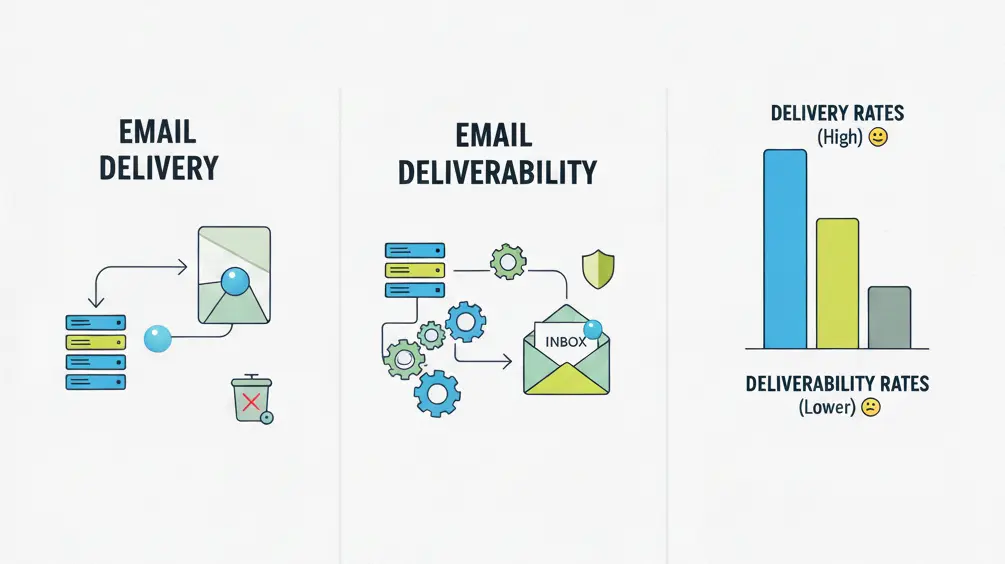
You can look at deliverability and delivery this way. The confirmation of acceptance of your letter by your mail carrier is delivery; in contrast, deliverability is the confirmation that your mail got to the intended mailbox and not the recycling bin. Most SMTP providers keep reporting delivery rates prominently because they look good.
The only figures that are truly significant are the deliverability rates, which are harder to quantify, and are usually more disappointing.
Four factors that influence inbox placement
- Sender reputation: Your reputation score with Gmail, Yahoo, and Outlook depends on your sending practices. Issues such as high bounce rates, spam complaints, or sudden spikes in your email volumes can cause your sender score to plummet. However, it takes about four to eight weeks of consistent good behavior to rebuild the trust you broke, and there are some service providers who may never fully trust you again.
- Authentication protocols (pass/fail gate): SPF, DKIM, and DMARC ensure that emails actually come from your domain. If you don’t have proper authentication in place, legitimate emails with great content will still trigger spam filters. You can quickly confirm your domain’s SPF, DKIM, and DMARC configuration with EasyDMARC DNS lookup, which reads your live DNS records and highlights missing or failing entries before they start dragging down deliverability. Gmail and Yahoo now require all three for bulk senders, which is anyone sending 5,000+ emails per day. This isn’t optional anymore.
- Content quality: Spam filters look for red flags, such as too much capitalization, suspicious links, and image-heavy emails with little text. The thing that usually catches people off guard: even well-written emails get filtered if they match patterns most spammers use. Using a URL shortener? That’s a potential red flag. Including an attachment in a transactional email? Could be another if that email isn’t an auto invoice.
- Recipient engagement: When recipients open, click, and reply to your emails, mailbox providers notice and reward you. Low engagement is an indicator of unwanted content, which will push future emails toward spam. It becomes a feedback loop of sorts: poor deliverability reduces engagement, further harming deliverability.
Benchmark metrics: What good looks like
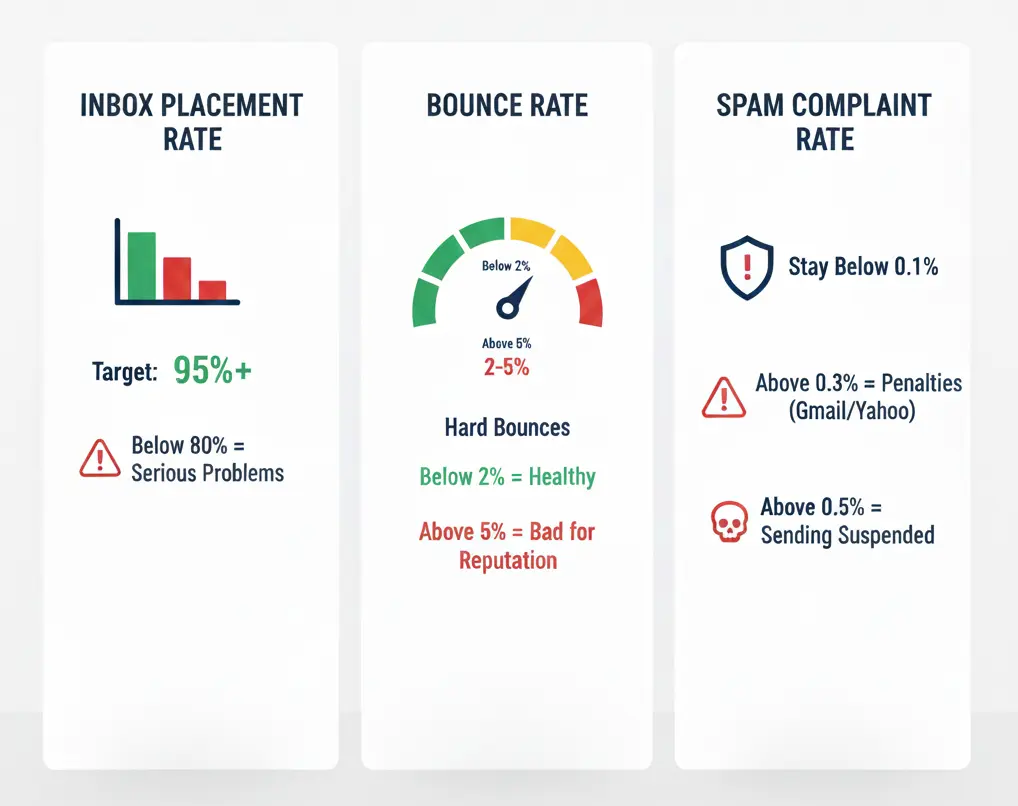
- Inbox placement rate: Strive for 95% on transactional emails, and 85%+ for marketing. While below 80% inbox placement indicates serious problems.
- Bounce rate: Keep hard bounces (invalid addresses) below 2%. Above 5% signals list hygiene problems that will damage your sender’s reputation.
- Spam complaint rate: Stay below 0.1% (1 complaint per 1,000 emails). Rates above 0.3% trigger deliverability penalties from Gmail and Yahoo. Above 0.5% will get your sending suspended.
How your SMTP provider impacts results
Shared vs. Dedicated IPs: The trade-off that most people get wrong
- Shared IPs: Multiple senders share IP addresses. Reputable and cost-effective and reputable providers carefully vet their customers to protect their pool reputation. Best for organizations sending under 100,000 emails per month-you benefit from the pool’s collective good reputation. Risk: one bad actor can temporarily affect everyone.
- Dedicated IPs: Your organization gets exclusive IP addresses with full control over reputation. Best for organizations sending 100,000+ emails monthly with consistent patterns.
IP warm-up: The process that makes or breaks new senders
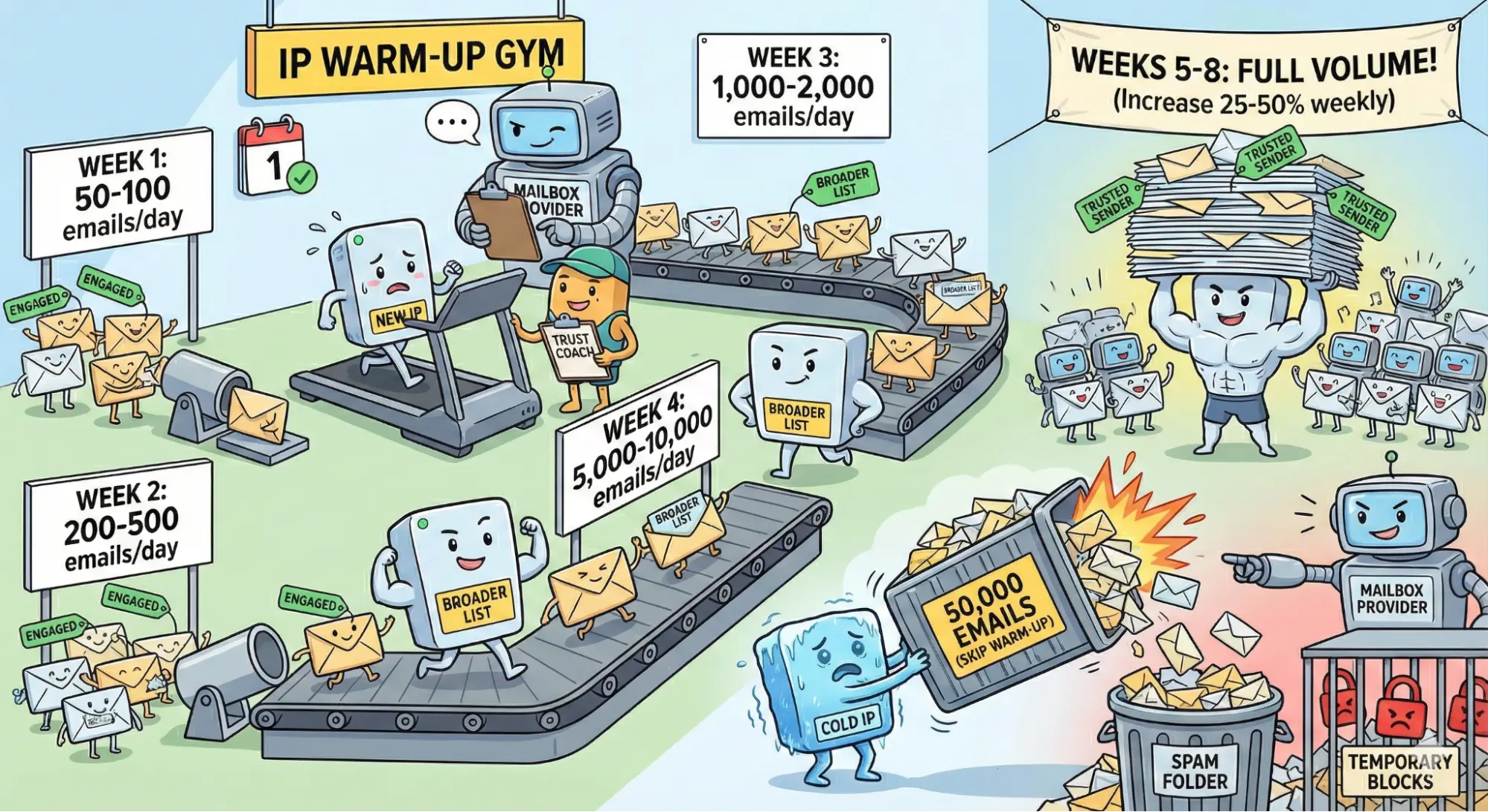
New IP addresses do not have any reputation history. Mailbox providers treat them with suspicion until they prove trustworthy. The process of IP warm-up gradually grows the sending volume over 4-8 weeks:
- Week 1: 50-100 emails/day to your most engaged recipients
- Week 2: 200-500 emails/day, still prioritizing engaged users
- Week 3: 1000-2000 emails/day, expanding to a wider list
- Week 4: 5,000-10,000 emails/day, gradually moving toward maximum capacity
- Weeks 5-8: Increase 25-50% weekly until reaching full volume
What if you skip these steps and send 50,000 emails from a cold IP? You can expect 30-50% spam folder placement, or worse, temporary blocks from major providers.
Comparing major SMTP providers
Let’s look at how the major players stack up. I’m including honest assessments-every provider has trade-offs worth considering:
| Provider | Starting Price | Free Tier | Dedicated IP | Best For | Main Limitation |
| Mailtrap | $15/mo (10K) | 4K/mo | Business+ plan with 100K/mo | Developer teams with a strong deliverability focus | Newer platform with a smaller ecosystem |
| SendGrid | $19.95/mo(50K) | 100/day | $90/mo optional add-on | Marketing + transactional combo | Complex pricing; support quality varies |
| Mailgun | $15/mo (10K) | 100/day (trial) | $59/mo extension available | Apps best suited for developers | Weak marketing tools and short-term log data |
| Amazon SES | $0.10/1K emails | 3K/mo (for 12 months) | Included | AWS-heavy orgs; high volume | Minimal analytics; steep learning curve |
| Postmark | $15/mo (10K) | Free trial | Included on all plans | Transactional; speed critical | Limited templates and marketing features |
Key criteria for assessing providers
- Authentication support: Look for providers that go beyond the standard SPF/DKIM/DMARC features. Do thez check your DNS setup and alert you to any issues? Mailtrap provides a step-by-step setup process with automatic validation. SendGrid and Mailgun also feature similar guided configurations. In contrast, Amazon SES requires a greater level of technical know-how.
- IP management: Postmark is special in that all customers, regardless of the plan they choose, can have a dedicated IP, which is uncommon; you can also increase the volume of emails on any plan. You get a dedicated IP in Mailtrap on Business plans (100K+/month) with automatic warm-up. SendGrid and Mailgun charge an additional $60 to 90 per month.
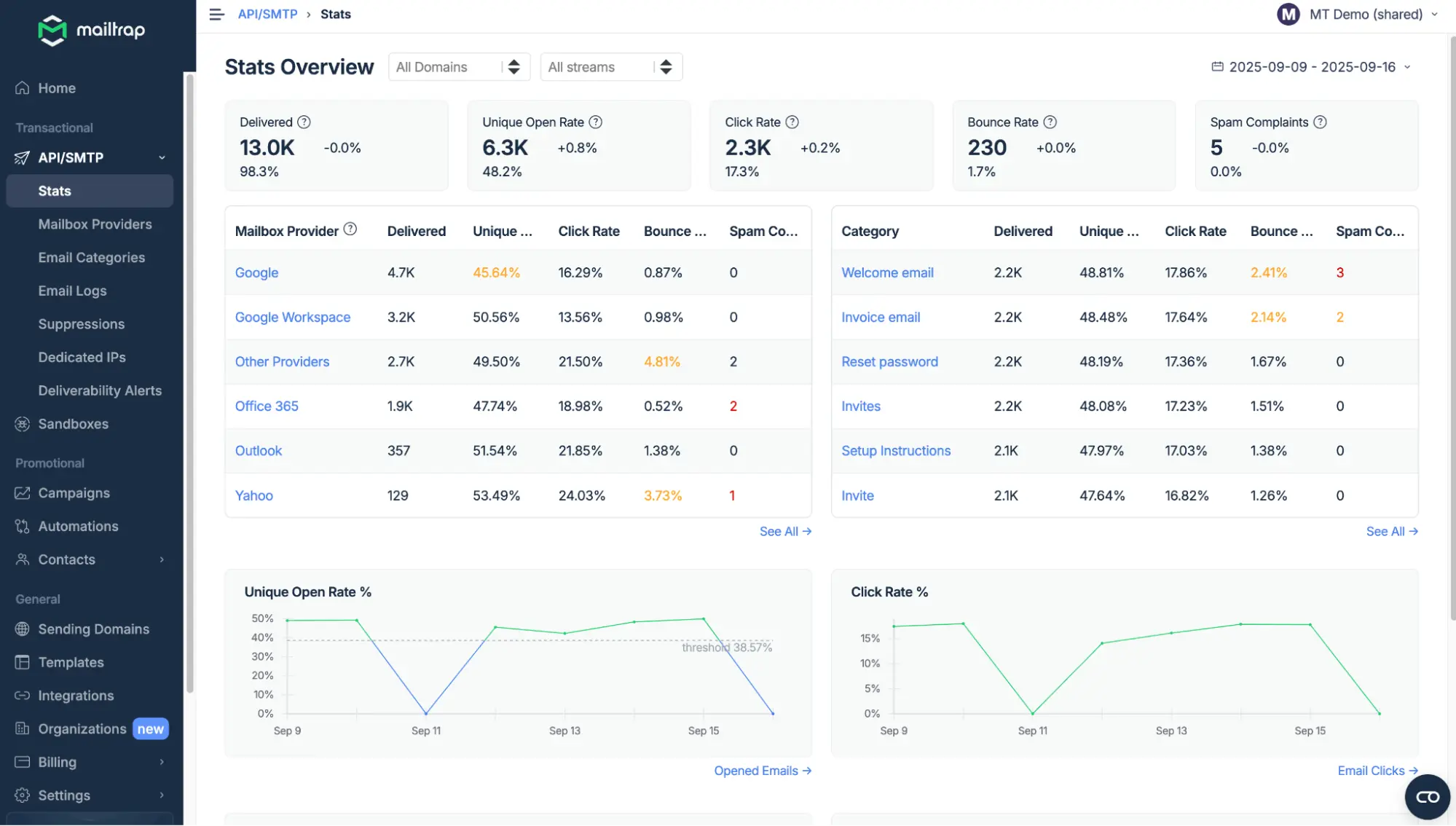
- Depth of analytics: Summary stats mask issues. Look for per-mailbox-provider breakdowns-Gmail, Yahoo, and Outlook are all different. Can you see bounce reasons, or just counts? How long are logs retained? Mailtrap’s provider-specific analytics help diagnose issues in a heartbeat. Postmark is great in this regard, too. Amazon SES requires you to build your own analytics using CloudWatch.
- Stream separation: Transactional emails, like password resets, have very different deliverability profiles from marketing emails. Marketing drives higher complaint rates-if those hurt your transactional reputation, customers will miss critical emails. Mailtrap and Postmark allow stream separation on any plan, while SendGrid offers it at higher tiers.
- Security and compliance: Mailtrap keeps GDPR compliance and ISO 27001 certification with TLS encryption, 2FA, and IP whitelisting. SendGrid (owned by Twilio) has extensive certifications. Amazon SES inherits AWS infrastructure.
Mailtrap: An honest review
Mailtrap’s strong points
- The individual analytics for each mailbox provider are really helpful. When your Gmail delivery goes down, you’ll know immediately, not hidden in the aggregate stats.
- The pricing is transparent, and both transactional API/SMTP and email campaigns are included within one subscription.
- The 24/7 support comprises of technical experience in deliverability while the enterprise customers also have a dedicated support through migration.
Mailtrap’s limitations
- Ecosystem maturity: Being newer than SendGrid or Mailgun means a smaller community and fewer Stack Overflow answers when you hit edge cases.
Who is Mailtrap for-and who isn’t?
Appropriate customer: Development and production teams that are in search of a high-deliverability, reliable platform. Examples would be organizations sending 10K to 500K mails monthly who desire deliverability insight; teams unhappy with vague analytics offered by the existing providers; organizations that need combined transactional + marketing.
Look elsewhere: If your organization is deep in AWS because SES is better integrated, and if your teams send under 10K emails a month because there are simpler options.
Pricing: Free (4K/month), Basic ($15 a month for 10K), Business ($85 for 100K with dedicated IP), Enterprise (custom with deliverability manager).
Practices that are more important than choosing a provider
Your SMTP provider can construct all the infrastructure they want to; however, at the end, it is your sending behavior that determines the results you’ll get. I’ve seen organizations that use premium providers struggling to achieve more than 60% inbox placement at times. I’ve also seen organizations using basic services achieve and maintain 95%+ inbox placement. The difference is always in these fundamentals:
- List hygiene is foundational. Use double opt-in. You’ll have fewer subscribers, but they’ll actually want your emails. In turn, you’ll improve engagement metrics that mailbox providers use for filtering. Remove addresses that have been inactive for 6+ months aggressively, and if you send at volume, you can do it more frequently (2-3 months). Validate new addresses with services like ZeroBounce or NeverBounce before they damage your reputation. A list of 10,000 engaged subscribers outperforms 50,000 inactive ones every time.
- Content patterns that trigger filters include: URL shorteners (spammers abuse them heavily, so filters are suspicious). Image-heavy emails that contain little text-use at least 60%+ text content. Misleading subject lines that don’t match content. Attachments in transactional emails use links to downloads instead. Excessive linking to external domains. These patterns catch legitimate senders constantly.
- Volume consistency counts. If you mail 5,000 a week and suddenly blast 50,000, mailbox providers get suspicious and may throttle or block your sending. For major campaigns, ramp volume over 3-5 days rather than sending all at once. Consistent, predictable patterns build trust with mailbox providers over time.
Troubleshooting: “My emails are going to spam”
Methodical diagnosis, not guesswork, pays when deliverability drops. Here’s what works:
Step 1-Authentication check: Use MXToolbox or Mail-Tester to verify that SPF, DKIM, and DMARC are set up correctly. This catches the most common issue. A single misconfigured DNS record can tank your deliverability overnight.
Step 2-Check the reputation: Google Postmaster Tools show how Gmail views your sending domain. It’s free and no other tool has this data. Services like Sender Score rate your IP reputation on a 0-100 scale. A damaged reputation takes 4-8 weeks of clean sending to recover. There is no shortcut.
Step 3-Analyze content: Before production sends, send test emails through spam-checking tools. Identify possible patterns of triggers you might have overlooked, because often a single link or phrase becomes the cause of the problem.
Step 4-Review engagement: Open rates below 15% and click rates below 2% signal unwanted content to mailbox providers. Segment your list and improve relevance. And sometimes, the fix isn’t technical-it’s sending better content to people who actually want it.
Making your decision
Every provider in this comparison can achieve 90%+ deliverability with proper sender practices. The differences are in how much visibility they provide and how well they’ll support you when things go wrong-because things can go wrong.
Focus on getting the basics right: authenticating correctly with SPF, DKIM, and DMARC; maintaining clean, engaged lists; consistent sending patterns; and sending content the recipients actually want.
These practices are more important than any provider selection. Most of the providers offer free tiers or trials; use them to test with your real sending patterns before actually purchasing a paid plan.